tkmilan#
tkinter’s evil twin.
Includes also some aliases to other models:
Binding: Alias formodel.Binding.Direction: Alias formodel.Direction.Justification: Alias formodel.Justification.CP: Alias formodel.CP.
Includes some light wrappers to other models, with improved API:
S: Wrapper formodel.Sticky
Module Attributes
DEPRECATED. |
|
Type-Checking variable type for |
|
Type-Checking variable type for |
|
Type-Checking variable type for |
|
Automatic Layout. |
|
Horizontal (1 row) Layout. |
|
Vertical (1 column) Layout. |
Functions
|
Legacy wrapper for |
|
Legacy wrapper for |
|
Legacy wrapper for |
|
Legacy wrapper for |
|
Shows spammy modules, should be silenced by the calling application. |
|
Legacy wrapper for |
|
Legacy wrapper for |
|
Wrapper for |
|
Wrapper for |
|
Wrapper for |
|
Wrapper for |
|
Legacy wrapper for |
|
Legacy wrapper for |
Classes
|
A button with a label and/or an image. |
|
A canvas that draws a |
|
A checkbox, simple boolean choice. |
|
A frame filled with checkboxes, with optional buttons for full state manipulation. |
|
A combobox widget, combining an entry and a listbox. |
|
A multiline text widget, supporting |
|
A validated |
|
An entry widget, single-line text editor. |
|
A frame to hold other widgets surrounded by a line, including a label. |
|
A frame to hold other widgets, with user-controllable relative sizes. |
|
A frame to hold other widgets, with a radio button. |
|
A frame to hold other widgets, with a checkbox. |
|
A simple frame to hold other widgets, visually invisible. |
|
A label, can be text, image, or both. |
|
A stateful |
|
A listbox widget, a list of strings. |
|
A listbox widget, with extra controls for a set of strings. |
|
A menu widget, specified by a top-level |
|
A tabbed interface to hold other containers. |
|
A tabbed interface to hold a series of uniform containers. |
|
A radio button, a choice between several options. |
|
A labelled frame filled with radio buttons. |
|
A stateful frame filled with radio buttons. |
|
Internal |
|
A root window, the toplevel widget for the entire application. |
|
Wrap |
|
A proxy widget to include functional scrollbars that works for all widgets. |
|
A proxy widget to include functional scrollbars. |
|
A secondary toplevel widget, similar to a second |
|
A separator, just a single line for grouping widgets. |
|
A spinbox widget, a numeric entry with buttons to change the value. |
|
A tooltip widget, a specialized |
|
|
|
A |
|
A hierarchical multicolumn data display widget. |
|
Type-Checking variable type for |
- class tkmilan.Button(parent: ContainerWidget, *, label: str | None = None, labelPosition: CP | bool | None = CP.E, image: Image | None = None, width: int | None = None, styleID: str | None = None, **kwargs)#
Bases:
Button,SingleWidgetA button with a label and/or an image.
This is a button, with a label and/or an image. The main interaction is being clicked on.
No state is included.
There is no Python documentation, see
Tkttk.Button documentation.- Parameters:
label (str | None) – The label to include inside the button. Optional. Can be given as a class variable.
labelPosition (CP | bool | None) – Label position, how to combine label and image. See
model.CP_Compoundfor the possible values.image (Image | None) – The image to show. Optional. See
Tktk.Image documentation.width (int | None) – The button width, in pixels. When
0, use the natural width. When negative, that is a minimum size. WhenNone, set to an ad-hoc calculation based on the label (fn.label_width). Defaults toNone.styleID (str | None) – Set a style identifier. Combined with the widget type in
RootWindow.register_styleID.parent (ContainerWidget) – The parent widget. Can be a
RootWindowor anothermixin.ContainerWidget.
- bindClick(action: Callable, **kwargs)#
Create a binding to be called when clicking this widget.
This is similar to a
trace.- Parameters:
action (Callable) – The function to be called when clicking the widget.
All other arguments are passed to the
actionfunction.See also
See
onClickfor an alternative to this.
- change(label: str | None = None, image: Image | None = None, *, width: int | None = None) None#
Change cosmetic aspects of the button.
Changing the button text changes the button width too, using the same considerations as the widget creation. Be advised this text is not stored anywhere, it’s calculation must be completely deterministic.
The button image must remain in the same “shape”: Buttons without image cannot get a new one, and Buttons with image cannot lose its image. The image size (
widthandheight) should also remain the same, but this is not enforced.- Parameters:
label (str | None) – The new text to show. Optional.
image (Image | None) – The new image to show. Optional.
width (int | None) – The button width, only considered when
labelis set. SeeButtonwidthargument.
Note
These are the same parameters as the constructor for
Button.
- onClick()#
Callback to be called when clicking this widget.
Defaults to doing nothing.
Available for subclass redefinition.
See also
See
bindClickfor an alternative to configure this.
- property wlabel: str#
Calculate the chosen label text.
- class tkmilan.Canvas(parent: ContainerWidget, diagram: Diagram, *, expand: bool = True, saveElements: bool | None = None, fps_redraw: int | None = 30, **kwargs)#
Bases:
Canvas,SingleWidgetA canvas that draws a
diagram.This is a canvas for drawing the given diagram. The diagram will be redrawn as the widget size changes, with a rate limit (see
fps_redraw, can be disabled).The diagram elements can be saved on the renderer, see
saveElementsbelow. This is disable by default, it has a memory impact and most uses do not require this. The elements themselves can be accessed usingitem.No state is included, this is used to summarize state for other widgets.
There is no Python documentation, see
Tktk.Canvas documentation.Note
The only supported way to draw on the canvas is to use the
diagramparameter.- Parameters:
diagram (Diagram) – Diagram to render.
saveElements (bool | None) – Save a mapping between element identifiers and its corresponding
DiagramElementon the renderer, see above for more information. Defaults toFalse.expand (bool) – Grow the widget to match the container grid size. This is usually supported for containers, but it is included here.
fps_redraw (int | None) – Rate limit for widget size redraw. Defaults to 30 fps, use
Noneto disable this adaptation.parent (ContainerWidget) – The parent widget. Can be a
RootWindowor anothermixin.ContainerWidget.
Note
The underlying widget is not part of
ttklike most others. All efforts are expended to make this an implementation detail, without practical effects.- eselection() int | None#
Get the current element identifier, that is, the item under the current mouse pointer.
Only one element can be marked as “current” at a time.
- Returns:
Return the current element identifier, or
Nonewhen nothing is selected.- Return type:
int | None
- export(what: str, outfile: Path, **kwargs)#
Export the diagram to any supported format, using arbitrary arguments.
This should only be used if you need dynamic format selection.
- Parameters:
what (str) – The export format.
outfile (Path) – The file to create.
See also
To pre-select particular formats, see
export_svg.
- export_svg(outfile: Path, **kwargs)#
Export the diagram contents in SVG format.
See
drender.Exporter_SVG.exportfor the exporter settings.- Parameters:
outfile (Path) – The file to create
- exy(event) XY#
Get the canvas coordinate for the given event.
Usually, the even is a button click or a mouse movement. To be used inside the
onClickElementfunction.
- genItemConfigure(eid: int, **state: Any)#
Generate a function to configure the given canvas element.
- Parameters:
eid (int) – The element to configure.
state (Any) – The new state to configure. This depends on the element type, see
Tkcanvas common options.
- item(eid: int) DiagramElement | None#
Get the diagram element corresponding to the given element.
This only works if the
saveElementsparameter isTruewhen creating theCanvas, seehasElements.- Parameters:
eid (int) – The element to consider
- Returns:
Return the element itself if it is being saved, otherwise return
None.- Return type:
DiagramElement | None
- itemCoords(eid: int) Iterable[XY]#
Find all the canvas element coordinates.
- Parameters:
eid (int) – The element to probe.
- Returns:
Yield a series of
diagram.XYfor all available coordinates. Note that the meaning for each element type is different.- Return type:
Iterable[XY]
- itemMarker(eid: int) str | None#
Get the marker corresponding to the given element.
This only works if the
saveElementsparameter is notNonewhen creating theCanvas, seehasElements.- Parameters:
eid (int) – The element to consider
- Returns:
Return the element marker if given on the diagram, otherwise return
None.- Return type:
str | None
- onClickElement(event: Any)#
Callback to be called when clicking any element.
Defaults to doing nothing.
Available for subclass redefinition.
See also
Use
eselectionto get the clicked element identifier. Useexyto get the clicked position.
- redraw(*args, **kwargs)#
Redraw the canvas, using arbitrary arguments.
This should only be used if you need to pass special arguments to the renderer.
- Parameters:
args – Passed to the upstream
renderer function.kwargs – Passed to the upstream
renderer function.
See also
Use
trigger_redrawin most situations.
- trigger_redraw(_a1: Any | None = None, _a2: Any | None = None)#
Trigger a canvas redraw, by (re)scheduling the idle timeout.
- Parameters:
_a1 (Any | None) – Optional, unused. This exists for API compatibility with bindings.
_a2 (Any | None) – Optional, unused. This exists for API compatibility with traces.
- property hasElements: bool#
Check if the elements or markers are being saved.
This depends on the
saveElementsparameter when creating the instance.
- class tkmilan.Checkbox(parent: ContainerWidget, *, label: str | None = None, readonly: bool = False, variable: Boolean | None = None, styleID: str | None = None, **kwargs)#
Bases:
Checkbutton,SingleWidgetA checkbox, simple boolean choice.
This is a checkbox with a label. The main interaction is being clicked on, which toggles its value. Technically, the
alternateGUI state allows for a trinary choice, but this is not directly supported as regular state.The state is a single
boolvalue.There is no Python documentation, see
Tkttk.Checkbutton documentation.- Parameters:
label (str | None) – The label to include besides the checkbox. Can be given as a class variable. It is included on the right side of the checkbox.
readonly (bool) – Should the widget allow interaction to toggle its value. Default to allowing interaction.
styleID (str | None) – Set a style identifier. Combined with the widget type in
RootWindow.register_styleID.parent (ContainerWidget) – The parent widget. Can be a
RootWindowor anothermixin.ContainerWidget.variable (Boolean | None) – Use an externally defined variable, instead of creating a new one specific for this widget.
Note
The upstream widget does not disable user interaction when
readonlyGUI state is enabled.This is worked around when the
readonlyargument is used, but this is not a dynamic setting like the GUI state. The “true”enabledstate is tracked on thereadonlystate. This only matters for advanced styling uses,gstatereturns the correct values.Uses a custom GUI state object, see
GuiState.See also
CheckboxFramefor multiple checkboxen managed at once.- class GuiState(enabled: bool | None = None, valid: bool | None = None, readonly: bool | None = None, alternate: bool | None = None)#
Bases:
GuiStateSince the
readonlyargument changes the semantics for the GUI state, in those cases the returned object uses thisGuiStatesubclass.
- toggle(_a1: Any | None = None, _a2: Any | None = None) None#
Switch the variable state to its opposite (
not).- Parameters:
_a1 (Any | None) – Optional, unused. This exists for API compatibility with bindings.
_a2 (Any | None) – Optional, unused. This exists for API compatibility with traces.
- property wlabel: str#
Calculate the chosen label text.
- class tkmilan.CheckboxFrame(*args, hasButtons: bool | Sequence[IButton] = True, stateDefault: bool | None = None, traceFn: Callable | None = None, style: Style = CheckboxFrame.Style(align_cb=False, min_btns=True), **kwargs)#
Bases:
FrameUnlabelledA frame filled with checkboxes, with optional buttons for full state manipulation.
This is a bunch of checkboxes, with optional buttons to enable or disable them all at once. Each checkbox is independent. Supports a nested specification for multiple checkboxen inside nested
FrameLabelled, there’s no limit to the nesting level.Each widget can be traced separately, with a non-ambigous function generator (see
traceFn). The widget ID and the labels can be customised usinglabelsCheckboxes.- Parameters:
stateCheckboxes – Mapping from identifier to
Checkboxlabel. Can be a nested mapping, keys and values must always bestr.stateDefault (bool | None) – Default state for all child widgets. Optional, is
Noneit’s not changed from theCheckboxdefault.traceFn (Callable | None) – Function generator for tracing each individual
Checkboxwidget. Receives the tree of nested widget ID as positional arguments.hasButtons (Union[bool, Sequence[CheckboxFrame.IButton]]) –
Include state manipulation buttons. Can be given as:
True: IncludeEnable All/Disable Allbuttons. This is the default.False: Do not include any buttonsA list of
IButtonobjects.
layout –
Layout setting for this frame. Only some values make sense:
R1,x: “Enable” / “Disable” buttons on bottom. This is the default.H1,x: “Enable” / “Disable” buttons on top.C1,x: “Enable” / “Disable” buttons on the right sideV1,x: “Enable” / “Disable” buttons on the left sideVERTICAL: Buttons on bottom, in a single column.HORIZONTAL: Buttons on the left side, in a single line.
All other layouts are possible, but they are ugly. Override
CheckboxFrame.setup_layoutin that case, for further tweaking.layoutCheckboxes –
layoutsetting for the internal nested frames. Can be a single string, to be applied everywhere, or a list of strings to be applied on each nested level. This affects the orientation of the child widgets only. Defaults to automatic layout, whenever is not given.label – Include a toplevel label, keeping the state as-is. Optional, similar to a choice between
FrameLabelledandFrameUnlabelled.labelsCheckboxes – Labels for internal nested widgets. Given as a mapping between nested identifiers and the label. For a simple case of a single level, the mapping key can be a simple string, instead of a tuple with a single string.
argFrame – Extra arguments passed to all nested frames. All the child widgets are
FrameLabelled, the toplevel widget is eitherFrameLabelled(whenlabelis given) orFrameUnlabelled(whenlabelis not given, the default).argCheckboxes – Extra arguments passed to each individual
Checkboxwidget.argButtons – Extra arguments passed to each individual
Buttonwidget. Overriden by theIButton.argsarguments.
Note
To create a version if this widget with a different base class (i.e.
FrameStatefulfor example), use the following workaround:class CheckboxFrameStateful(FrameStateful): wstate_single = 'frame' def setup_widgets(self, **kwargs): self.frame = tkmilan.CheckboxFrame(self, **kwargs) ... frame = CheckboxFrameStateful(PARENT, label='Frame Label', ...)
Note this is different from setting a
label.See also
Use
RadioFramefor a simpler version of this with radio buttons.Note
The child widgets are placed on an internal
FrameUnlabelled, namedcbox. The buttons are also child widget, identified by theirid.- class IButton(identifier: str, label: str | None = None, onClick: bool | Callable | None = None, onClickFn: Callable | None = None, onClickSetAll: bool | None = None, args: Mapping[str, Any] | None = None)#
Bases:
objectCheckboxFramebutton configuration object.- Parameters:
identifier (str) – Identifies the button
label (str | None) – Button Label. Optional, if
None, uses a label derived from theidentifieronClick (bool | Callable | None) – Widget
onClickchanges. Optional.onClickFn (Callable | None) – Function generator for
onClickfunction. Optional, overrides theonClickfunction. Receives the current widget as a single argument.onClickSetAll (bool | None) – Generate a
setAllcall, with the correct target. Optional, overrides theonClickfunction.args (Mapping[str, Any] | None) – Other arguments, passed to
Button. Optional.
- property id: str#
The final identifier
- property lbl: str#
The final widget label
- class Style(_default: bool = False, align_cb: bool = False, min_btns: bool = True)#
Bases:
WStyleCheckboxFramestyle object.These are the settings:
- Parameters:
align_cb (bool) – Align children
Checkbox, setstickytoS.VERTICALorS.HORIZONTAL. Useful when the labels have very different sizes. Only applied for simple layouts, defaults toFalse.min_btns (bool) – Minimize
Buttonsection (rows or columns). Only applied for simple layouts, defaults toTrue.
Note
These are implemented in
setup_layout, if that is redefined in sub-classes, these settings are no longer implemented.
- setAll(state: bool)#
Set the state for all child widgets.
- Parameters:
state (bool) – The state to consider.
- setup_adefaults()#
Set the widget traces.
See the upstream
setup_adefaultsdocumentation.Available for subclass redefinition, make sure this still runs.
- setup_defaults()#
Set the default values and wire up button events.
See the upstream
setup_defaultsdocumentation.Available for subclass redefinition, make sure this still runs.
- setup_layout(layout: str | None) None#
Setup the layout for this widget.
Adjusts the row and column configuration for the buttons, and align checkboxen, if the layout is simple. Controllable with
Style.See the upstream
setup_layoutdocumentation.Available for subclass redefinition.
- wbutton(identifier: str) Button#
Get the button widget by identifier.
This is just an helper function to get the correct widget value out of
widgets, based on the identifier.- Parameters:
idx – The button identifier.
Note
In debug mode, this will fail if called with the wrong identifier. This check is skipped for performance on optimized mode.
- wcbox(*identifiers: str) Checkbox#
Get the inner
Checkboxwidget by nested identifier.This is just an helper function to get the correct checkbox widget out of a sequence of identifiers.
Equivalent of starting in
cboxand searching itswidgetsrecursively. Perfect fortraceFn, the “tree of nested widget ID” can be passed to this function directly.- Parameters:
identifiers (str) – A sequence of widget indentifiers.
- Returns:
Return the corresponding widget.
- Return type:
- widgets: Mapping[str, MixinWidget]#
Store mapping between widget name and
widget object.See
setup_widgets.
- wstate_single: Union[None, bool, str] = 'cbox'#
Default value for
wstate_single.
- class tkmilan.ComboboxN(parent: ContainerWidget, vspec: SpecCountable | VSpec, *, readonly: bool = True, validation: VSettings | Callable | bool | None = True, label: str | None = None, justify: Justification | None = None, style: Style = ComboboxN.Style(manyvalues=False, complexvalidation=False), styleID: str | None = None, **kwargs)#
Bases:
Combobox,SingleWidget,MixinValidationSingleA combobox widget, combining an entry and a listbox.
This is a combobox, an
EntryRawwith a button that shows a pop-upListboxwith the variable options.The entry can be
readonly, in which case the only possible values are the ones shown on the value list, otherwise the entry is editable with arbitrary values, just like anyEntryRaw.The widget state is a
VState, with the value being specified on the variable. A simplestrlabel can also be set.There is no Python documentation, see
Tkttk.Combobox documentation.- Parameters:
vspec (SpecCountable | VSpec) – The shared
specified variableor thespecification itselfattached to this widget. Mandatory.readonly (bool) – Should the widget allow arbitrary state changes, possibly to unknown values. Defaults to
True, the only way to change the state is by using the listbox selection.validation (VSettings | Callable | bool | None) – Configure widget validation. Defaults to validating based on variable state.
justify (Justification | None) – Justify combobox text. Defaults to
model.Justification.Centerifreadonly(the default),model.Justification.NoJustifyotherwise.label (str | None) – The label to include besides the combobox. Not implemented yet.
styleID (str | None) – Set a style identifier. Combined with the widget type in
RootWindow.register_styleID.parent (ContainerWidget) – The parent widget. Can be a
RootWindowor anothermixin.ContainerWidget.
Note
Even though this widget is configured as
readonly, it’s still possible to have invalid values if the variable is used on other non-readonlywidgets, or if it is programatically changed ignoring the specification.If you want to make sure this is truly read-only (and therefore always valid), do not reuse the variable anywhere else.
- class Style(_default: bool = False, manyvalues: bool = False, complexvalidation: bool = False)#
Bases:
WStyleComboboxNstyle object.There are the settings:
- Parameters:
manyvalues (bool) – This combobox is used with many values. The UX is not very good for comboboxes with many values.
complexvalidation (bool) – Skip warning about
ComboboxN.changevaluesStateargument. This is for values changes with very complex validation, requiring avoiding infinite loops. Advanced usage, make sure you know what you are doing.
- state_type#
alias of
SpecCountable
- change(values: Sequence[str] | None, valuesState: bool = False) None#
Change some aspects of the combobox.
You can change the values shown on the combobox dropdown, but by default this does not change the validation itself. That is, values not shown, but present on the original spec are still valid. See
ValidationLabelsif you want to enforce the shown value list.Usually, this is used to filter the values shown on the combobox. If you extend the supported values, you get a warning on debug mode.
If the widget validation is complex, use
valuesStateto change the state when changing the values, otherwise the validation state is not fully calculated. There is a warning about this in debug mode, if detected.- Parameters:
values (Sequence[str] | None) – The new values to show.
valuesState (bool) – Update the state when changing the values. When
False, just force the post validation function. Defaults toFalse, make sure to set toTruewhen using complex validations, likeValidationLabels.
- ValidationLabels = VSettings(postVar=True, postInitial=True, fn=<function ComboboxN.__vlabels_Combobox>, fnSimple=False, tt=None, ttSimple=False, tkWhen='none')#
Configure widget validation to consider the configured widget labels.
To be used as:
ComboboxN(self, ...
          validation=ComboboxN.ValidationLabels,
          ...
          )
- class tkmilan.EntryMultiline(parent: ContainerWidget, *, variable: String | None = None, style: Style = EntryMultiline.Style(font_base='TkTextFont', colour_bg_on='white', colour_bg_off='lightgrey', colour_link_normal='blue', colour_link_visited='purple', cursor_link='hand2'), **kwargs)#
Bases:
Text,SingleWidgetA multiline text widget, supporting
LTMLcontents.This is a multiline version of the
EntryRawwidget, with rich text capabilities. Supports only the readonly state, that is, the widget contents can only be edited programatically.The state is a single
strvalue, internally parsed toparser.LTML.There is no Python documentation, see
Tktk.Text oreffbottk.Text documentation.- Parameters:
variable (String | None) – Use an externally defined variable, instead of creating a new one specific for this widget.
style (Style) – Configure the widget style.
parent (ContainerWidget) – The parent widget. Can be a
RootWindowor anothermixin.ContainerWidget.
Note
The underlying widget is not part of
ttklike most others. All efforts are expended to make this an implementation detail, without practical effects.- class Style(_default: bool = False, font_base: str = 'TkTextFont', colour_bg_on: str = 'white', colour_bg_off: str = 'lightgrey', colour_link_normal: str = 'blue', colour_link_visited: str = 'purple', cursor_link: str | None = 'hand2')#
Bases:
WStyleEntryMultilinestyle object.These are the settings:
- Parameters:
font_base (str) – Base Font name, for all the widget.
colour_bg_on (str) – Widget background, when enabled.
colour_bg_off (str) – Widget background, when disabled.
colour_link_normal (str) – Hyperlink foreground colour, normal links.
colour_link_visited (str) – Hyperlink foreground colour, visited links.
cursor_link (str | None) – Hyperlink cursor. Set only when hovering over the links. Optional, disabled when set to
None.
- as_editable()#
Temporarily mark the widget as editable.
A context manager, used to change the contents of the widget while keep it “readonly”. Technically, this should only be used internally, using the state tracker functions, but it might be useful externally.
This is to be used like this:
# `widget` is readonly
with widget.as_editable():
    pass  # `widget` is editable
# `widget` is readonly
- binding_tag(tag: str, sequence: str, *args, key: str | None = None, immediate: bool = True, **kwargs) BindingTag#
Binds a sequence to a tag.
Stores all widget tag bindings on a per-instance dictionary, for later usage. Note that all dictionary keys must be different. For the same bindings on a single widget tag, this requires passing the
keyargument.See the
Tktag bind documentation.- Parameters:
key (str | None) – Optional. Defaults to the
sequenceitself. Useful to support multiple bindings on the same sequence, for the same tag.
All other arguments are passed to
model.BindingTagobject.
- onClickTag(tag: str, tag_index: str, tags_other: Sequence[str]) None#
Callback to be called when clicking
atags in this widget.Defaults to doing nothing.
Available for subclass redefinition.
- Parameters:
tag (str) – The main tag type. In this case, it’s always
a.tag_index (str) – The tag index. See
LTMLAutomatic Counter tags.tags_other (Sequence[str]) – List of extra tags attached to the anchor. Might be empty.
- style_reset(event=None, *, a: bool = True, b: bool = True, i: bool = True) None#
Reset the style to the original.
- Parameters:
a (bool) – Reset
aanchors.b (bool) – Reset
bbold inline spans.i (bool) – Reset
iitalic inline spans.event – Optional, unused. This exists for API compatibility with the
onClickfunctions.
- wstateLTML() Iterable[TextElement]#
Return the parsed LTML state, as a generator of
model.TextElement.See also
wstate: Return the LTML string.wstateText: Return the underlying text, without any tags.
- wstateText() str#
Strip all LTML tags and return the underlying text.
See also
wstate: Return the LTML string.wstateLTML: Generate a list of LTML parsed objects.
- styleSheet: Mapping[str, Mapping[str, Any]] | None = None#
Store a style sheet mapping identifiers/classes to styling configuration.
Identifiers are marked on LTML as
<span id="something">, and on the style sheet as#something.Classes are marked on LTML as
<span class="something">, and on the style sheet as.something.There is no Python documentation, see
Tktext tags documentation.
- class tkmilan.EntryN(parent: ContainerWidget, vspec: Spec | VSpec, *, readonly: bool = False, validation: VSettings | Callable | bool | None = True, justify: Justification = Justification.Center, expand: bool = False, label: str | None = None, styleID: str | None = None, **kwargs)#
Bases:
Entry,SingleWidget,MixinValidationSingleA validated
EntryRaw.This is an alternative
EntryRaw, validated.The widget state is a
VState, with the value being specified on the variable. A simplestrlabel can also be set.There is no Python documentation, see
Tkttk.Entry documentation.Note
The
validationandreadonlyparameters are conflicting.When
readonlyis set, and the validation is unchanged from its default (True, validating based on variable state), the value is disabled instead (set toFalse). This is to avoid what seems unnecessary validations.If you need to override this behavious, use manually define a
model.VSettingsobjectvalidation=tkmilan.model.VSettings(fnSimple=True), this is the equivalent to the defaultTruesetting. The warning will be triggered in that case (only for debug binaries).- Parameters:
vspec (Spec | VSpec) – The shared
specified variableor thespecification itselfattached to this widget. Mandatory.readonly (bool) – Should the widget allow interaction to toggle its value.
validation (VSettings | Callable | bool | None) – Configure widget validation. Defaults to validating based on variable state.
justify (Justification) – Justify combobox text. Defaults to
model.Justification.Center.expand (bool) – Grow the widget to match the container grid size, horizontally. Defaults to
False.label (str | None) – The label to include besides the entry. Not implemented yet.
styleID (str | None) – Set a style identifier. Combined with the widget type in
RootWindow.register_styleID.parent (ContainerWidget) – The parent widget. Can be a
RootWindowor anothermixin.ContainerWidget.
- class tkmilan.EntryRaw(parent: ContainerWidget, *, variable: String | None = None, readonly: bool = False, justify: Justification = Justification.NoJustify, expand: bool = False, label: str | None = None, styleID: str | None = None, **kwargs)#
Bases:
Entry,SingleWidgetAn entry widget, single-line text editor.
This is an entry box, a single-line editor for strings. The main interaction is editing the text contained within.
The state is a single
strvalue, there is no validation.There is no Python documentation, see
Tkttk.Entry documentation.- Parameters:
variable (String | None) – Use an externally defined variable, instead of creating a new one specific for this widget.
readonly (bool) – Should the widget allow interaction to toggle its value. Default to allowing interaction.
justify (Justification) – Justify entry text. Defaults to
model.Justification.NoJustify, the upstream default.expand (bool) – Grow the widget to match the container grid size, horizontally. Defaults to
False.label (str | None) – The label to include besides the entry. Not implemented yet.
styleID (str | None) – Set a style identifier. Combined with the widget type in
RootWindow.register_styleID.parent (ContainerWidget) – The parent widget. Can be a
RootWindowor anothermixin.ContainerWidget.
- class tkmilan.FrameLabelled(parent: ContainerWidget, *args, label: str | None = None, labelAnchor: CP = CP.default, styleID: str | None = None, **kwargs)#
Bases:
Labelframe,ContainerWidgetA frame to hold other widgets surrounded by a line, including a label.
This is a frame with a label. It is visually separated from the other widgets. You can control the label position.
There is no Python documentation, see
Tkttk.LabelFrame documentation.- Parameters:
label (str | None) – The label to include on the frame separator. Can be given as a class variable.
labelAnchor (CP) – The position of the label on the frame separator. Given as one of the cardinal points. Defaults to a OS-specific location (
model.CP.default).styleID (str | None) – Set a style identifier. Combined with the widget type in
RootWindow.register_styleID.parent (ContainerWidget) – The parent widget. Can be a
RootWindowor anothermixin.ContainerWidget.
See also
FrameUnlabelled: Invisible version, without a label.FrameStateful: Support for an embeddedCheckboxas label.FrameRadio: Support for an embeddedRadioas label.- property wlabel: str#
Calculate the chosen label text.
- class tkmilan.FramePaned(parent: ContainerWidget, *args, orient: Literal['vertical'] | Literal['horizontal'] | None = None, weight: int | None = None, weights: Mapping[str, int] | None = None, styleID: str | None = None, **kwargs)#
Bases:
Panedwindow,ContainerWidgetA frame to hold other widgets, with user-controllable relative sizes.
This is similar to a
FrameUnlabelled, restricted to horizontal or vertical layouts, but where the interfaces between the children can be adjusted by the user, to resize them at will.This allows some child widgets to be hidden, by resizing the other panes to fully occupy the widget area.
When resizing this widget, the space difference is distributed among child widgets, using
weight. The default is1for all children, all are resized equally. When setting0as weight, the child widget will not be automatically resized. This weight can be defined in four ways (mappings will be merged), from less to more specific:Argument
weight: Use this value for all widgets.Object parameter
pweigth: Use this value for all widgets.Argument
weights: Use the mapping between widget names and its weight.Object parameter
pweigths: Use the mapping between widget names and its weight.
Note that using this with more than two children can be confusing for the users, particularly when resizing takes place.
There is no Python documentation, see
Tkttk.PanedWindow documentation.- Parameters:
layout – The orientation of the child widgets. Restricted to
VERTICALorHORIZONTAL.orient (Literal['vertical'] | ~typing.Literal['horizontal'] | None) – Alias for “layout”.
weight (int | None) – The weight for each children widget. Optional, defaults to 1.
weights (Mapping[str, int] | None) – Per-child widget. Optional, defaults to the common “weight”.
styleID (str | None) – Set a style identifier. Combined with the widget type in
RootWindow.register_styleID.parent (ContainerWidget) – The parent widget. Can be a
RootWindowor anothermixin.ContainerWidget.
Note
The
layout/orientargument has similar semantics tolayoutargument on other frame types.See also
FrameUnlabelled,FrameLabelled: Similar versions, without user control over sizing.
- layout_padable: bool = False#
Default value for
layout_padable.
- pweigth: int = 1#
Default weight for all widgets.
See complete documentation on the description above.
- pweigths: Mapping[str, int] | None = None#
Map widget names to weight.
See complete documentation on the description above.
- class tkmilan.FrameRadio(parent: ContainerWidget, *args, rvariable: Spec, rvalue: str, label: str | None = None, labelAnchor: CP = CP.default, rstateReversed: bool = False, rstateArgs: Mapping[str, Any] | None = None, styleID: str | None = None, **kwargs)#
Bases:
Labelframe,ContainerWidgetA frame to hold other widgets, with a radio button.
This is a frame with an embedded radio button
rstate_widgetas “label”. This label controls the enabled state of the child widgets. You can control the radio button position.Unlike other widgets, the variable must be created separately and given in addition to the value. See
Radio.Note that
styleIDis reused for the embedded radio button. This means that applying a style here requiresRadioto be styled too.There is no Python documentation, see
Tkttk.LabelFrame documentation. Note thelabelwidgetoption.- Parameters:
rvariable (Spec) – The shared variable attached to this widget. Requires a specification too, see
var.Specfor more information. Mandatory.rvalue (str) – The value for this particular widget. Must be specified by the
rvariable, this is checked. Mandatory.label (str | None) – The label to include besides the widget. Can be given as a class variable.
labelAnchor (CP) – The position of the label on the frame separator. Given as one of the cardinal points. Defaults to a OS-specific location (
model.CP.default).rstateReversed (bool) – Reverse the
rstatevalue that controls the child widget state. This means when the embedded radio button is selected, the inner widgets are disabled, and vice versa. Defaults toFalse.rstateArgs (Mapping[str, Any] | None) – Extra arguments for the
rstatewidget,rstate_widget.styleID (str | None) – Set a style identifier. Combined with the widget type in
RootWindow.register_styleID.parent (ContainerWidget) – The parent widget. Can be a
RootWindowor anothermixin.ContainerWidget.
See also
FrameLabelled: A simpler version of this, without the embedded radio button.FrameStateful: A variant of this widget, with a checkbox.
- isSelected() bool#
Check if this specific widget is selected.
- rstate: Spec#
The variable holding the embedded
Radiostate.Used on the
rstate_widget.
- rstate_widget: __w_rstate#
The widget for the embedded
Radio.Uses the
rstatevariable.Note
The widget is a local
Radiosubclass, specific for this widget.Note
When tracing this, use
atraceto guarantee your callback runs after the child widgets are changed.
- property wlabel: str#
Calculate the chosen label text.
- class tkmilan.FrameStateful(parent: ContainerWidget, *args, label: str | None = None, labelAnchor: CP = CP.default, cvariable: Boolean | None = None, cvariableDefault: bool | None = None, cstateReadonly: bool = False, cstateReversed: bool = False, cstateArgs: Mapping[str, Any] | None = None, styleID: str | None = None, **kwargs)#
Bases:
Labelframe,ContainerWidgetA frame to hold other widgets, with a checkbox.
This is a frame with an embedded checkbox
cstate_widgetas “label”. This label controls the enabled state of the child widgets. You can control the checkbox position.Note that
styleIDis reused for the embedded checkbox. This means that applying a style here requiresCheckboxto be styled too.There is no Python documentation, see
Tkttk.LabelFrame documentation. Note thelabelwidgetoption.- Parameters:
label (str | None) – The label to include on the frame separator. Can be given as a class variable.
labelAnchor (CP) – The position of the label on the frame separator. Given as one of the cardinal points. Defaults to a OS-specific location (
model.CP.default).cvariable (Boolean | None) – Use an externally defined
cstatevariable, instead of creating a new one specific for thecstatewidget.cvariableDefault (bool | None) – The default value for
cstate. WhenNone, the value is not changed at start. Defaults to starting enabled, unlesscvariableis given, for which the value is not changed.cstateReadonly (bool) – Make the
cstatewidget readonly, that is, the user cannot change it directly. It can still be changed programatically (e.g. calculated based on other widget values). Defaults toFalse.cstateReversed (bool) – Reverse the
cstatevalue that controls the child widget state. This means when the embedded checkbox is disabled, the inner widgets are enabled, and vice versa. Defaults toFalse.cstateArgs (Mapping[str, Any] | None) – Extra arguments for the
cstatewidget,cstate_widget. The following keys are overriden:variable(seecvariable),label(seelabel),readonly(seecstateReadonly),styleID(seestyleID).styleID (str | None) – Set a style identifier. Combined with the widget type in
RootWindow.register_styleID.parent (ContainerWidget) – The parent widget. Can be a
RootWindowor anothermixin.ContainerWidget.
See also
FrameLabelled: A simpler version of this, without the embedded checkbox.FrameRadio: A variant of this widget, with a radio button.
- bindCStateChanged(action: Callable, **kwargs)#
Create a binding to be called when
cstatechanges.This is similar to a
trace.- Parameters:
action (Callable) – The function to be called when
cstatechanges.
All other arguments are passed to the
actionfunction.See also
See
onCStateChangedfor an alternative to this.
- onCStateChanged(status: bool) None#
Callback to be called when
cstatechanges.The “status” represents the children status. It’s not the exactly the
cstatestate, when “cstateReversed” is used, this is reversed.Defaults to doing nothing.
Available for subclass redefinition.
- Parameters:
state –
Trueif the state is enabled,Falseotherwise. Usually follows thecstatestate, but see “cstateReversed”.
- toggle(_a1: Any | None = None, _a2: Any | None = None) None#
Switch the
cstatevariable state to its opposite (not).This should only be used if the current frame has the
wstate_single_wstatemarking. This is checked for debug binaries, and a warning is produced.- Parameters:
_a1 (Any | None) – Optional, unused. This exists for API compatibility with bindings.
_a2 (Any | None) – Optional, unused. This exists for API compatibility with traces.
- cstate: Boolean#
The variable holding the embedded
Checkboxstate.Used on the
cstate_widget.See also
cvariable: This can be configured as an external variable.
- cstate_widget: __w_cstate#
The widget for the embedded
Checkbox.Uses the
cstatevariable.Note
The widget type is a local
Checkboxsubclass, specific for this widget.Note
Instead of tracing this, see
onCStateChanged, to consider “cstateReversed”. When tracing this, useatraceto guarantee your callback runs after the child widgets are changed.
- property wlabel: str#
Calculate the chosen label text.
- class tkmilan.FrameUnlabelled(parent: ContainerWidget, *args, styleID: str | None = None, **kwargs)#
Bases:
Frame,ContainerWidgetA simple frame to hold other widgets, visually invisible.
This is the simplest form of
mixin.ContainerWidget, just a bunch of widgets. There’s no separation between the outside and the inside of the frame.There is no Python documentation, see
Tkttk.Frame documentation.- Parameters:
styleID (str | None) – Set a style identifier. Combined with the widget type in
RootWindow.register_styleID.parent (ContainerWidget) – The parent widget. Can be a
RootWindowor anothermixin.ContainerWidget.
See also
FrameLabelled: Visible version, with a label.- widgets: Mapping[str, MixinWidget]#
Store mapping between widget name and
widget object.See
setup_widgets.
- class tkmilan.Label(parent: ContainerWidget, *, label: str | None = None, anchor: CP | None = None, justify: Justification | None = None, labelPosition: CP | bool | None = CP.E, image: Image | None = None, expand: bool | None = None, styleID: str | None = None, **kwargs)#
Bases:
Label,SingleWidgetA label, can be text, image, or both.
This is a label, a static-ish widget without interaction.
This must include at least some text or an image, even though both are optional.
No state is included.
There is no Python documentation, see
Tkttk.Label documentation.- Parameters:
label (str | None) – The text to show. Optional. Can be given as a class variable.
anchor (CP | None) – Align the text inside the widget. See below for how the default is calculated.
justify (Justification | None) – The text justification. See below for how the default is calculated.
labelPosition (CP | bool | None) – Label position, how to combine label and image. See
model.CP_Compoundfor the possible values.image (Image | None) – The image to show. Optional. See
Tktk.Image documentation.expand (bool | None) – Grow the widget to match the container grid size, horizontally. See below for how the default is calculated.
styleID (str | None) – Set a style identifier. Combined with the widget type in
RootWindow.register_styleID.parent (ContainerWidget) – The parent widget. Can be a
RootWindowor anothermixin.ContainerWidget.
Note
There are at least 4 align options that might interact in weird ways.
labelPositiononly concerns how the label and image are aligned. This only matters when both are included.If only the image is included,
expanddefaults toFalse.If the label exists, the other 3 options govern its alignment.
If the label has a single line, the default
expandvalue depends ifjustifyis given and notmodel.Justification.NoJustify. The default is not expanding, but if there’s a non-default justification,expandsdefaults toTrue(otherwise it would have no effect). IfexpandisTrue, thejustifyvalue is used to calculate theanchorvalue, and the “real”justifyvalue defaults tomodel.Justification.Center.If the label has multiple lines,
expanddefaults toFalse,justifydefaults tomodel.Justification.Centerandanchordefaults tomodel.CP.center.In a nutshell, if the label has a single line, set
justifyonly. If it has multiple lines, set bothalignandjustify. The image andlabelPositionoptions are orthogonal, they do not interact with the text alignment.- change(label: str | None = None, image: Image | None = None) None#
Change cosmetic aspects of the label.
The label text must remain in the same “shape”: Single or Multiline strings are supported, but cannot be changed at runtime between them.
The label image must remain in the same “shape”: Labels without image cannot get a new one, and Labels with image cannot lose its image. The image size (
widthandheight) should also remain the same, but this is not enforced.- Parameters:
label (str | None) – The new text to show. Optional.
image (Image | None) – The new image to show. Optional.
Note
These are the same parameters as the constructor for
Label.
- property wlabel: str#
Calculate the chosen label text.
- class tkmilan.LabelStateful(parent: ContainerWidget, *, variable: String | None = None, anchor: CP | None = None, justify: Justification | None = None, labelPosition: CP | bool | None = CP.E, image: Image | None = None, expand: bool = False, styleID: str | None = None, **kwargs)#
Bases:
Label,SingleWidgetA stateful
Label, where the text is controlled by a variable.This is an alternative
Label, where the text is controlled by a variable. It’s an alternative to manually callingLabel.change, or a read-onlyEntryRaw.There is no Python documentation, see
Tkttk.Label documentation.- Parameters:
variable (String | None) – Use an externally defined variable, instead of creating a new one specific for this widget.
anchor (CP | None) – Align the text inside the widget. Optional.
justify (Justification | None) – The text justification. Optional.
labelPosition (CP | bool | None) – Label position, how to combine label and image. See
model.CP_Compoundfor the possible values.image (Image | None) – The image to show. Optional. See
Tktk.Image documentation.expand (bool) – Grow the widget to match the container grid size, horizontally. Defaults to
False.styleID (str | None) – Set a style identifier. Combined with the widget type in
RootWindow.register_styleID.parent (ContainerWidget) – The parent widget. Can be a
RootWindowor anothermixin.ContainerWidget.
- change(label: str | None = None, image: Image | None = None, anchor: CP | None = None, justify: Justification | None = None) None#
Change “cosmetic” aspects of the label.
The label text is technically not a cosmetic aspect, but it is provided here for compatibility with
Label.change.The label image must remain in the same “shape”: LabelStateful without image cannot get a new one, and LabelStateful with image cannot lose its image. The image size (
widthandheight) should also remain the same, but this is not enforced.- Parameters:
label (str | None) – The new text to show. Optional.
image (Image | None) – The new image to show. Optional.
anchor (CP | None) – The new anchor setting. Optional.
justify (Justification | None) – The new justification setting. Optional.
Note
These are the same parameters as the constructor for
LabelStateful.
- class tkmilan.Listbox(parent: ContainerWidget, *, variable: StringList | None = None, label: str | None = None, columnConfig: Mapping[str, Any] | None = None, height: int | None = None, minHeight: int | None = None, maxHeight: int | None = None, selectable: bool = True, expand: bool | None = None, style: Style = Listbox.Style(show_headings=True, show_labels=False, selectable_nodoubleclick=True, altbg=False, altbg_sindex=1, colour_altbg='lightgrey', autosize_label='AutoSize', autosize_lcolumn_lspace=20, autosize_lcolumn_osize=20, autosize_heading_multiplier=6, autosize_styleid=None), **kwargs)#
Bases:
TreeA listbox widget, a list of strings.
This is a modern variation of the listbox, a way to display several rows of content (simple strings, in this case), and be able to select one at a time.
The
heightcan be hardcoded to a value, or it can vary with the contents. Note that themaxHeightis smaller than the amount of rows to display, no scrollbar is shown, but the list can be scrolled with the mouse wheel. The automatic variation on the height size (AKA auto-height) can be completely disabled by setting all height-related arguments toNone. This is the default. Theexpandargument is set toFalsewhen the auto-height is disabled.Each string is centered on the list. This can be tweaked using the
columnConfigargument.The state is a
listofstrvalues,var.StringList.This is a variation on the
Treewidget, with a single column, a different variable type and some overriden default values.See also
Python ttk.TreeviewandTkttk.Treeview documentation.- Parameters:
variable (StringList | None) – Use an externally defined variable, instead of creating a new one specific for this widget.
label (str | None) – The label to include besides the listbox. Can be given as a class variable. Optional, when given is show as the single column heading.
columnConfig (Mapping[str, Any] | None) – Override configuration for the single column. Advanced usage only.
height (int | None) – If given, always show this quantity of rows. If it is
None, the number of permanently shown rows will vary betweenminHeightandmaxHeight.minHeight (int | None) – If
heightisNone, make sure this number of rows is always visible. Optional, whenNone, there’s no lower limit on the visible number of rows.maxHeight (int | None) – If
heightisNone, make sure there are no more visible rows than this number. Optional, whenNone, there’s no upper limit on the visible number of rows.selectable (bool) – See
Treefor its meaning. Defaults toTrue.style_altbg – See
Treefor its meaning. Defaults toFalse.expand (bool | None) – See
Treefor its meaning. Defaults toFalse, but interacts with the auto-height settings.style (Style) – Configure the widget style.
styleID – Set a style identifier. Combined with the widget type in
RootWindow.register_styleID.parent (ContainerWidget) – The parent widget. Can be a
RootWindowor anothermixin.ContainerWidget.
- class Style(_default: bool = False, show_headings: bool = True, show_labels: bool = False, selectable_nodoubleclick: bool = True, altbg: bool = False, altbg_sindex: Literal[0, 1] = 1, colour_altbg: str = 'lightgrey', autosize_label: str = 'AutoSize', autosize_lcolumn_lspace: int = 20, autosize_lcolumn_osize: int = 20, autosize_heading_multiplier: int = 6, autosize_styleid: str | None = None)#
Bases:
StyleListboxstyle object.See
Tree.Stylefor upstream values, these are the differences:- Parameters:
altbg (bool) – Disabled by default.
show_labels (bool) –
As upstream, also hides the other column.
This is necessary if you want to show row-level images on the
Listbox, but it will have a gap even when there is no image, which is why it’s not the default. This is verified on debug mode, seeetag.Disabled by default.
- state_type#
alias of
StringList
- static ListboxElement(string: str) TreeElement#
Create a
model.TreeElementfrom a singlestr.Since a
Listboxis a specializedTree, it needs this function to create theTreestate, not exposed onListbox.
- elementAppend(string: str) str#
Append a string to the
Listboxwithout recreating the state.Uses
ListboxElementto create the necessarymodel.TreeElement.See also
See the underlying
Tree.element_appendfunction for usage and return value.
- elementInsert(string: str, where: None | int | str = 0) str#
Insert a string on the
Listboxwithout recreating the state.Uses
ListboxElementto create the necessarymodel.TreeElement.See also
See the underlying
Tree.element_insertfunction for usage and return value.
- genMoveSelected(delta: int | Literal['top'] | Literal['bottom'], **kwargs) Callable#
Generate a function to move the currently selected element to a new index.
The
deltaargument difference between the current index and the intended location. There are also two special values:top: Move the element to the top of the listbottom: Move the element to the bottom of the list.
- Parameters:
delta (int | Literal['top'] | ~typing.Literal['bottom']) – Where to move the element. See above.
All other arguments are passed to the upstream
wselfunction.- Returns:
A function that can be used as callback for
onClickfunctions.- Return type:
Callable
- genRemoveAll() Callable#
Generate a function to remove all elements.
- Returns:
A function that can be used as callback for
onClickfunctions.- Return type:
Callable
- genRemoveSelected() Callable#
Generate a function to remove the currently selected element.
- Returns:
A function that can be used as callback for
onClickfunctions.- Return type:
Callable
- class tkmilan.ListboxControl(parent, *args, style: Style = ListboxControl.Style(lbl_moveUp='↑', lbl_rmAll=None, lbl_rm='-', lbl_add='+', lbl_addAll=None, lbl_moveDown='↓', autolbl__All_size=3), **kwargs)#
Bases:
FrameUnlabelledA listbox widget, with extra controls for a set of strings.
This is complex variation on
Listbox, with extra widgets for manipulating the string list. This is useful to manipulate string lists.The extra widget controls can be grouped as follows:
There is a
ComboboxNto select the element to add. There is a button to insert after the currently selected element, or append otherwise; clicking on this button with the middle mouse button will always append to the end of the list. There is another button to add all supported elements (keeping the existing order); clicking on this button with the middle mouse button replaces all elements with all supported elements, in the original order.There are buttons to remove the currently selected element, or clear all elements.
There are buttons to manipulate the order of the currently selected element, upwards or downwards. Clicking on these buttons with the middle mouse button moves the currently selected element to the top or bottom of the list.
All these groups are configurable, see the
button*arguments.Note
When
buttonOneis set toFalse, it might be interesting to move the button widgets to the right side. Set thelayoutargument aslayout='C1,x'to achieve this configuration.- Parameters:
selAll – Specification for all supported elements.
selList – Initial selected string list.
buttonOne – Include buttons for adding a single element, and removing the selected element. This controls the
ComboboxNplacement too.buttonAll – Include buttons for adding all supported elements and clean all elements. Defaults to include.
buttonOrder – Include buttons to manipulate the order of selected element. Defaults to not include.
selectedKwargs – Passed to the
Listboxobject. Some options are ovverriden:selectableis enabled,scrollHorizontalis set toFalse,scrollVerticalis set toNone.allKwargs – Passed to
ComboboxNobject.kwargs – All other arguments are passed to
Listbox.
Note
The container widget is
FrameUnlabelled, and the inner widgets are:Listbox(withScrolledWidgethandling):selectedComboboxN:allButton:moveUprmAllrmaddaddAllmoveDown
- class Style(_default: bool = False, lbl_moveUp: str = '↑', lbl_rmAll: str | None = None, lbl_rm: str = '-', lbl_add: str = '+', lbl_addAll: str | None = None, lbl_moveDown: str = '↓', autolbl__All_size: int = 3)#
Bases:
WStyleListboxControlstyle object.These are the settings:
- Parameters:
lbl_moveUp (str) – Label for
moveUpwidget.lbl_rmAll (str | None) – Label for
rmAllwidget. Optional, seeautolbl__All_size.lbl_rm (str) – Label for
rmwidget.lbl_add (str) – Label for
addwidget.lbl_addAll (str | None) – Label for
addAllwidget. Optional, seeautolbl__All_size.lbl_moveDown (str) – Label for
moveDownwidget.autolbl__All_size (int) – When
rmAll/addAllare unset, default to thisrm/addlabel, repeated this amount of times. Defaults to3.
- setup_adefaults()#
Runs after all widgets are stable.
Avoid changing state on this function.
Note
Available for subclass redefinition.
See also
setup_defaults: Run code right after this widget is setup, before all widgets are stable.
- setup_defaults()#
Runs after the widget is completely setup.
Note this runs before the parent widget is complete ready.
Useful to set default values. Do not configure layout-related settings here, see
setup_layout.Note
Available for subclass redefinition.
See also
setup_adefaults: Run code after all widgets are stable (including parent widgets in the tree).
- setup_layout(layout: str | None) None#
Useful for manual adjustments to the automatic layout.
This runs after all automatic layout settings are configured.
- Parameters:
layout (str | None) – This is the processed version of the layout string.
Note
Available for subclass redefinition.
- gkeys: FrozenSet[str]#
The supported
model.GuiStatekeys.
- isAuto: Optional[bool]#
Marker that tracks the automatic state setup.
One of the following values:
True: Include on automatic widget and GUI states. Default.False: No automatic widget state, but keep in on the GUI state. This makes the widget stateless, but it still participates in the automatic GUI state changes. Very useful for helper containers.None: No automatic widget nor GUI states. This makes the widget basically invisible.
Note
This was called
isHelperin older versions. Turn allisHelper=FalseintoisAuto=False(unless you have a good reason to isolate GUI state).See also
See
putAutofor an ergonomic way to set this on child widgets.
- layout: str | None = 'R1,x'#
Store the processed layout
- widgets: Mapping[str, MixinWidget]#
Store mapping between widget name and
widget object.See
setup_widgets.
- wstate_single: Union[None, bool, str] = 'selected'#
Default value for
wstate_single.
- class tkmilan.Menu(parent: ContainerWidget, cspec: Tuple[MenuElement, ...], *, title: str | None = None, tearoff: bool = False, wname: str = 'menu', **kwargs)#
Bases:
Menu,MenuWidgetA menu widget, specified by a top-level
menu.Root.This menu is a nested array of elements attached to the parent widget’s menubar. Usually this menubar is attached to the top of the
RootWindow, but this depends on the operating system (Mac puts it on the top of the current screen instead).Only one of the trees is visible at a time, while the mouse is hovering over it. These elements can have state. See
menufor the specification of supported element types.Use the
tearoffargument to include an option that creates a floating copy of each sub-menu. The sub-menu titles are taken from the nested labels, with a prefix given by thetitleargument (if given). Thistearoffargument should be reserved for legacy applications, modern application should avoid this outdated UX.The menu widget is analogous to a
ContainerWidget, but the children are not “real” widgets, seeMenuWidgetfor further clarification. Most of the container API is supported, likewstate, traces, etc.Each element click can be “traced”, see
onClickfunction. When dealing with state, it’s much more robust to trace the variables directly.Each sub-menu opening can be “traced”, see
onOpenfunction.- Parameters:
parent (ContainerWidget) – The parent widget. Should be a
RootWindow.cspec (Tuple[MenuElement, ...]) – Processed children specification. Usually a
menu.Rootor equivalent.title (str | None) – Define a menu title and prefix for children. Only matters when
tearoffis enabled. Optional, defaults toMenu Rootwithout child prefixes.tearoff (bool) – Include the tear-off option on top of all child
model.MenuElementCascade. The child titles depend on the giventitle. Optional, default toFalse.function. (All other arguments are passed to the upstream wsel) –
- bindClick(action: Callable, **kwargs)#
Create a binding to be called when clicking a
menu element.This is similar to a
trace.- Parameters:
action (Callable) – The function to be called when clicking a menu element.
All other arguments are passed to the
actionfunction.See also
See
onClickfor an alternative to this.
- bindOpen(action: Callable, **kwargs)#
Create a binding to be called when opening a
sub-menu.This is similar to a
trace.- Parameters:
action (Callable) – The function to be called when opening a sub-menu.
All other arguments are passed to the
actionfunction.See also
See
onOpenfor an alternative to this.
- onClick(spec: MenuElement, parents: Sequence[MenuElementCascade], *, evariable: Variable | None = None, cmenu: Menu, cidx: int)#
Callback to be called when clicking a
menu element.Defaults to doing nothing.
Available for subclass redefinition.
- Parameters:
spec (MenuElement) – The clicked
model.MenuElementparents (Sequence[MenuElementCascade]) – The list of parent
model.MenuElementCascadeevariable (Variable | None) – The variable attached to the
model.MenuElement, if available.Nonefor elements that do no include any state.cmenu (Menu) – The
Menuinstance which is being clicked.cidx (int) – The
Menuentry index which is being clicked.
Note
cmenu/cidxis part of the API for now, but this is subject to change.
- onOpen(spec: MenuElementCascade, parents: Sequence[MenuElementCascade], *, cmenu: Menu, cidx: int)#
Callback to be called when opening a
sub-menu.Defaults to doing nothing.
Available for subclass redefinition.
- Parameters:
spec (MenuElementCascade) – The clicked
model.MenuElementCascadeparents (Sequence[MenuElementCascade]) – A tuple of parent
model.MenuElementCascadecmenu (Menu) – The
Menuinstance which is being clicked.cidx (int) – The
Menuentry index which is being clicked.
Note
cmenu/cidxis part of the API for now, but this is subject to change.
- cspec: Tuple[MenuElement, ...]#
Store the children specification
- class tkmilan.Notebook(parent: ContainerWidget, *args, layout: None = None, traversal: bool = True, traversalWraparound: bool = False, styleID: str | None = None, **kwargs)#
Bases:
Notebook,ContainerWidgetA tabbed interface to hold other containers.
This is a tabbed interface to show several containers in the same space.
You can manipulate the tab order and visibility with
torderandtorder_change, seeNotebookTabOrder.The individual tabs must all be containers (include proxy widgets for containers), there’s no support for single widgets. Use a holder
FrameUnlabelledto show a single widget for each tab.There is no Python documentation, see
Tkttk.Notebook documentation.- Parameters:
traversal (bool) – Setup tab traversal with special keyboard shortcuts, and also with mouse wheel scrolling. See the Tk documentation for the keyboard part. Enabled by default.
traversalWraparound (bool) – When
traversalis setup, configure wraparound. That is, scrolling to the next tab from the last one should “scroll” into the first tab, and vice-versa for the first tab. This only matters for the mouse wheel traversal, the keyboard shortcuts always enable this traversal. Disabled by default.styleID (str | None) – Set a style identifier. Combined with the widget type in
RootWindow.register_styleID.layout (None) – Ignored, it is hardcoded to
Nonealways.parent (ContainerWidget) – The parent widget. Can be a
RootWindowor anothermixin.ContainerWidget.
See also
NotebookUniform: A simpler version of this, when each individual tab is the same typeNote
The
traversalWraparoundsetting cannot be harmonised with the existing Control-Tab/Control-Shift-Tab, this is an upstream limitation. See theTkNotebook keyboard traversal documentation.Note
As mentioned above, use the following code to support a single widget per tab:
class NB_Inner(tkmilan.FrameUnlabelled):
    wstate_single = 'inner'

    def setup_widgets(self):
        self.inner = InnerWidget(self)

class NB(tkmilan.Notebook):
    def setup_tabs(self):
        return {
            't1': NB_Inner(self),
        }
- Tab#
Alias for
model.NotebookTabclass.alias of
NotebookTab
- setup_tabs(*args, **kwargs) Mapping[str, NotebookTab]#
Define the tabs here.
Similar to
setup_widgets, but definesmodel.NotebookTab, extra information about each widget.
- setup_widgets(*args, **kwargs)#
Define the sub widgets based on the tabs.
Do not overwrite this unless you know what you are doing.
To edit the tabs, see
setup_tabs.
- torder_change(*, enable: Iterable[str] | None = None, disable: Iterable[str] | None = None, hide: Iterable[str] | None = None)#
Change the tab order settings.
Manipulate the
torderwith a simplified interface for incremental changes. Accept sequences of tab identifiers.The validation covers most common cases: manipulating missing identifiers, ambigous changes, etc. This is fully validated in debug mode, but fully skipped in production, for performance characteristics.
See the
NotebookTabStateTfor further explanation of the “types”.- Parameters:
enable (Iterable[str] | None) – Put the given tabs in visible normal state.
disable (Iterable[str] | None) – Put the given tabs in visible disable state.
hide (Iterable[str] | None) – Hide the given tabs.
- torder_cidx(*idxs: str, enable: bool | None = None, disable: bool | None = None, hide: bool | None = None)#
Change the tab order settings for several tabs.
This is an ergonomic alternative to
torder_changefor applying the same operation on several tabs, using simple boolean values.To use, call this function with a list of tab indexes to operate, and one of the three optional keyword arguments, setting a boolean value.
This will set the corresponding tab states to the following mappings (
True/False):enable:enable/disabledisable:disable/enablehide:hide/enable
- Parameters:
idxs (str) – The tab indexes to consider
enable (bool | None) – Enable or Disable the tabs. Defaults to
None, see above.disable (bool | None) – Disable or Enable the tabs. Defaults to
None, see above.enable – Hide or Enable the tabs. Defaults to
None, see above.
See also
Wraps
torder_changewith a different interface.
- wselect(idx: str) None#
Select a tab by identifier.
- Parameters:
idx (str) – The tab identifier.
Note
In debug mode, this will fail if called with the wrong identifier. This check is skipped for performance on optimized mode.
- wselection() str#
Search for the current selected tab.
- Returns:
This functions searches for the currently selected tab, and returns its identifier (the key on the
wtabsdictionary).- Return type:
str
- wtab(idx: str) ContainerWidget#
Get the tab widget by identifier.
This is just an helper function to get the correct widget value out of
wtabs.- Parameters:
idx (str) – The tab identifier.
Note
In debug mode, this will fail if called with the wrong identifier. This check is skipped for performance on optimized mode.
- layout_padable: bool = False#
Should this container’s children be automatically padded, when requested.
Most containers behave well when padding children, but some are problematic, mark those at class level (set
layout_padable = False).
- property torder: NotebookTabOrder#
Tab Order
- wtabs: Mapping[str, NotebookTab]#
Mapping of tab identifiers, and
Tabobjects.
- class tkmilan.NotebookUniform(*args, tabids: Mapping[str, str] | None = None, **kwargs)#
Bases:
NotebookA tabbed interface to hold a series of uniform containers.
This is a variant of the regular
Notebookspecially created to simplify the usual case where all the tabs are very similar (usually, they are the same underlying class).- Parameters:
tabids (Mapping[str, str] | None) – A mapping of tab identifiers and tab titles.
tabArgs – Arguments passed to the
Tabobject.function. (All other keyword arguments are passed to the setup_tab) –
See also
Notebook: A fully generic version of this. Don’t try to make thesetup_tabfunction too complex, move to this widget instead.- setup_tab(identifier: str, name: str, **kwargs) ContainerWidget#
Define the common tab
ContainerWidgethere.Similar to
setup_tabs, but for a single tab widget.
- setup_tabs(*args, tabArgs: Mapping[str, Any] | None = None, **kwargs: Any) Mapping[str, NotebookTab]#
Define the sub tabs, based on the common tab.
Do not overwrite this unless you know what you are doing.
To edit the common tab, see
setup_tab.
- class tkmilan.Radio(parent: ContainerWidget, variable: Spec, *, value: str, label: str | None = None, styleID: str | None = None, **kwargs)#
Bases:
Radiobutton,SingleWidgetA radio button, a choice between several options.
This is a radio button with a label. The main interaction is being clicked on, which sets its value. The same variable is shared between several widgets, each one contributing a single
value. When each widget is enabled, the variable is set to that value.Unlike other widgets, the variable must be created separately and given. It does not make much sense to create a variable to be used in a single radio button.
The state is a single
strvalue.There is no Python documentation, see
Tkttk.Radiobutton documentation.- Parameters:
label (str | None) – The label to include besides the widget. Can be given as a class variable. It is included on the right side of the radio button.
variable (Spec) – The shared
specified variableattached to this widget. Mandatory.value (str) – The value for this particular widget. Must be specified by the
variable, this is checked. Mandatory.styleID (str | None) – Set a style identifier. Combined with the widget type in
RootWindow.register_styleID.parent (ContainerWidget) – The parent widget. Can be a
RootWindowor anothermixin.ContainerWidget.
- isSelected() bool#
Check if this specific widget is selected.
This is equivalent to checking if the
variableis set to thevaluechosen for this particular widget.
- property wlabel: str#
Calculate the chosen label text.
- class tkmilan.RadioFrameLabelled(parent: ContainerWidget, *args, label: str | None = None, labelAnchor: CP = CP.default, styleID: str | None = None, **kwargs)#
Bases:
FrameLabelledA labelled frame filled with radio buttons.
This is a bunch of
Radiowidgets inside aFrameLabelled, all connected to the same internal variable. That variable is exposed as the only state.The internal variable is created anew, there is no support for using an external variable.
- Parameters:
stateRadio – Mapping from label to value. This should be a
StaticMap.frameArgs – Extra arguments passed to the inner
FrameUnlabelledwidget. UseradioArgsfor the inner radio widget args, seeRadioFrameUnlabelled.
See also
Use
CheckboxFramefor a version of this with checkboxen, with extra features.Use
RadioFrameStatefulfor a stateful frame version of this.- wstate_single: Union[None, bool, str] = 'raw'#
Default value for
wstate_single.
- class tkmilan.RadioFrameStateful(parent: ContainerWidget, *args, label: str | None = None, labelAnchor: CP = CP.default, cvariable: Boolean | None = None, cvariableDefault: bool | None = None, cstateReadonly: bool = False, cstateReversed: bool = False, cstateArgs: Mapping[str, Any] | None = None, styleID: str | None = None, **kwargs)#
Bases:
FrameStatefulA stateful frame filled with radio buttons.
This is a bunch of
Radiowidgets inside aFrameStateful, all connected to the same internal variable. That variable is exposed as the only state, besides theFrameStatefulstate.The internal variable is created anew, there is no support for using an external variable. It can be access with
self.raw.variable.- Parameters:
stateRadio – Mapping from label to value. This should be a
StaticMap.frameArgs – Extra arguments passed to the inner
FrameStatefulwidget. UseradioArgsfor the inner radio widget args, seeRadioFrameUnlabelled.
See also
Use
CheckboxFramefor a version of this with checkboxen, with extra features.Use
RadioFramefor a labelled frame version of this.- cstate: Boolean#
The variable holding the embedded
Checkboxstate.Used on the
cstate_widget.See also
cvariable: This can be configured as an external variable.
- cstate_widget: __w_cstate#
The widget for the embedded
Checkbox.Uses the
cstatevariable.Note
The widget type is a local
Checkboxsubclass, specific for this widget.Note
Instead of tracing this, see
onCStateChanged, to consider “cstateReversed”. When tracing this, useatraceto guarantee your callback runs after the child widgets are changed.
- gkeys: FrozenSet[str]#
The supported
model.GuiStatekeys.
- isAuto: Optional[bool]#
Marker that tracks the automatic state setup.
One of the following values:
True: Include on automatic widget and GUI states. Default.False: No automatic widget state, but keep in on the GUI state. This makes the widget stateless, but it still participates in the automatic GUI state changes. Very useful for helper containers.None: No automatic widget nor GUI states. This makes the widget basically invisible.
Note
This was called
isHelperin older versions. Turn allisHelper=FalseintoisAuto=False(unless you have a good reason to isolate GUI state).See also
See
putAutofor an ergonomic way to set this on child widgets.
- widgets: Mapping[str, MixinWidget]#
Store mapping between widget name and
widget object.See
setup_widgets.
- wstate_single: Union[None, bool, str] = 'raw'#
Default value for
wstate_single.
- class tkmilan.RadioFrameUnlabelled(parent: ContainerWidget, *args, style: Style = RadioFrameUnlabelled.Style(align_vertical=None), **kwargs)#
Bases:
FrameUnlabelledInternal
RadioFrameLabelled/RadioFrameStatefulwidget definition.This can be used as an alternative, in case you really need a unlabelled frame alternative.
- Parameters:
radioArgs – Extra arguments passed to inner
Radiowidgets.
See also
Use
RadioFrameLabelledorRadioFrameStatefulin the common case.Warning
Don’t use this directly, unless you really know what you are doing.
- class Style(_default: bool = False, align_vertical: bool | None = None)#
Bases:
WStyleRadioFrameUnlabelledstyle object.These are the settings:
- Parameters:
align_vertical (bool | None) – When enabled, and the layout has a single column, adjust the child widths to the full extent of the frame. This means the
Radiowidgets are aligned. When set toNone, enable it only if the widget labels have different sizes. Defaults toNone.
- wstate_single: Union[None, bool, str] = True#
- class tkmilan.RootWindow(*args, theme: str | None = None, theme_simple: bool = True, rpad: int | None = 5, imgfolder: Path | None = None, cls: str = 'tkmilan', style: Style = RootWindow.Style(tool_window=False, toplevel=False, clear_ro='white smoke', checkbox_ro=True, button_justify=Justification.Center, scaling_dpi=False), **kwargs)#
Bases:
Tk,ContainerWidgetA root window, the toplevel widget for the entire application.
Usually there’s only one of this in a single application. Multiple root windows are unsupported.
The
setup_imagesfunction can be overriden to load any number of images in any way. The common usage of loading all images in a folder is supported directly withimgfolder.On debug mode, this will sanity check the entire GUI, by reading its state. This doesn’t happen in production.
See
tkinter.Tk.- Parameters:
theme (str | None) – Theme to use. Default to choosing a tasteful choice depending on the OS and
theme_simple.theme_simple (bool) – When choosing a default theme, prefer a beautiful theme, without the full feature range. If you use the full feature range (custom colours, complex state validation), set this to
False. Does nothing ifthemeis chosen, this only affects the default selection. Defaults toTrue.rpad (int | None) – Recursively pad all container widgets. See
ContainerWidget.pad_container. Disable withNone, defaults to5pixels.imgfolder (Path | None) – Folder with images to be loaded (see
setup_images_folder). Optional.cls (str) – Window Class Name. Defaults to
"tkinter", the project name, so that it can be distiguished from the upstream default,"Tk".style (Style) – Configure the widget style.
Note
Technically, it should be OK to use multiple root windows per-process, but this hasn’t been tested, there are no test cases where this makes sense.
- class Style(_default: bool = False, tool_window: bool = False, toplevel: bool = False, clear_ro: str | None = 'white smoke', checkbox_ro: bool = True, button_justify: Justification = Justification.Center, scaling_dpi: bool | float = False)#
Bases:
WStyleRootWindowstyle object.These are the settings:
- Parameters:
tool_window (bool) – When enabled, marks the window as a tool window, not a regular window. The precise meaning of this setting depends on the OS.
toplevel (bool) – When enabled, shows the window above all other windows.
clear_ro (str | None) – When enabled, set this color as the readonly background for particular widgets:
ComboboxNandSpinboxN. This is useful to distinguish readonly from normal and disabled widgets.combobox_ro – When enabled, tweak the default
Checkboxstyle to distinguish the readonly and the true disabled states visually (there is a complex logic with the states, see theCheckboxdocumentation). Enabled by default.scaling_dpi (bool | float) –
Optionally set the scaling factor to be used internally, applied to the whole application.
When set to
False(the default), do not set the scaling factor. When set toTrue, use OS primitives to gather the correct DPI scale factor. When set to afloating point, use the given scale.There is no Python documentation, see
Tkscaling documentation. See also the relatedfn.process_scaling_dpifunction.Note
Only Windows OS are supported, it’s a no-op on other OS.
Note
To control window fullscreen state, see
rgstate.
- debug__sanity_check()#
Read the root GUI state
- eventloop_queue(eventloop: str, task: Type[ELReq] | ELReq, priority: int | None = None) None#
Queue a task on the given
EventLoop.- Parameters:
See also
See the upstream
queuefunction documentation.
- gbinding(*args, immediate: bool = True, **kwargs) BindingGlobal#
Create a
model.BindingGlobalfor this application.- Parameters:
immediate (bool) – Passed to the upstream object, default to enabling the binding on creation. This is the opposite from upstream.
All arguments are passed to the
model.BindingGlobalobject.
- get_eventloops(*, bus: bool | None = None) Iterator[Tuple[str, EventLoop]]#
Get all
Event Loopsobjects, with possible filters.- Parameters:
bus (bool | None) –
Consider the
EventLoopconfigured for Event Bus (seeuse_eventbus).If
True, only configured are included.If
False, only not configured are included.If
None, all are included.
Defaults to
None.
- process_event_bus() None#
Post-Process EventBus registrations.
This runs after
setup_eventloops. Validates all EventBus registration calls are valid, aggregates “ALL”EventLoopregistrations, and uses theEventLoopobject as dictionary key, instead of a simple string. This greatly improves performance on the EventBus implementation, and validates errors as soon as possible.Most deep validations are only done on debug mode, for performance reasons.
- register_eventbus_response(callback: Callable[[EventLoop, int | None, ELRes | bool], Any], *, eventloop: str | None = None, event: None | Type[bool] | Type[ELRes] | Sequence[None | Type[bool] | Type[ELRes]] = None) None#
Register an Event Bus callback, optionally filtering by
Event Loop, and one or more event types.Register the given
callbackon the Event Bus, to be called when an event appears on a configuredEvent Loop. Each response can be registered with multiple overlapping callbacks.This must be called before the Event Bus is processed for runtime usage, it’s not a dynamic registration. Make sure to call this from
setup_defaults.To filter the
Event Loopwhere this applies use theeventloopargument. To filter the event type where this applies use theeventarguments. See below for more information on how this is supported.- Parameters:
callback (Callable[[EventLoop, int | None, ELRes | bool], Any]) – The callback to register. See the
bg.ELCallbackcallbackdefinition for the function requirements.eventloop (str | None) – Filter by
EventLoop, given as astr(key foreL). Optional, whenNone, runs for all availableEventLoop.event (None | Type[bool] | Type[ELRes] | Sequence[None | Type[bool] | Type[ELRes]]) –
Filter by event type. Can be given as any of the following types:
bg.ELRessubclass, to filter only those response typesboolto filter onlyEventLoopsignalsNone, to run for all events and signals
A sequence of any combination of the previous types is also accepted, equivalent to calling the function for each type. Mixing
Noneand any other type in a sequence is an error.
Note
There is a limitation on how the
Event typeis processed, subclasses are not supported. That is, when you subscribe to an event type, subclasses of that event type are not considered. They can be registered manually if needed.Avoid mixin
Event typesubclassing and Event Bus.See also
Configure the
EventLooponsetup_eventloops, anduse_eventbus.
- register_styleID(argument: str | None, thisClass: str, *otherClasses: str) str#
Register a styleID, based on an argument, and the current widget style classes.
The styleID can represent a combination of simpler styles, by using
|to separate the corresponding keys.Called by each widget type, it must define “thisClass” as mentioned in
Tkdocumentation, a different string for each widget type. “otherClasses” are configured the same way, but they do not gateSee Python docs in Ttk Styling, see
Tkstyle documentation.- Parameters:
argument (str | None) – The styleID subclasses, separated by
|. This is defined by the final GUI designer. Optional.thisClass (str) – The class for the current widget.
- Returns:
An empty string indicates no style is applied, see
Tkwidget style argument documentation.- Return type:
str
- setup_eventloops() Mapping[str, EventLoop] | None#
Define the application
Event Loops.Runs after
setup_defaults, so all child widgets should be ready.- Returns:
Return a
dictmapping friendly names and objects. SeeeL. Optional, is this returnsNone, an empty mapping is stored.- Return type:
Mapping[str, EventLoop] | None
See also
See
use_eventbusto configure an Event Bus for theEvent Loop.See
start_eventloopsfor a simple way to start the event loops. Make sure this is done later.
- setup_image_data(key: str, data: bytes, dtype: str, *, cache_clear: bool = True, lazy: bool = True) None#
Register a single image, from arbitrary data.
This is useful to avoid external image files and hardcode all image data on the binary itself.
The data can be given as a base64 byte string. This can be computed from a file
$IMAGEusing the following commandbase64 --wrap=0 <"$IMAGE"
By default, the image data itself is lazy loaded, that is, only read from the files as the images are requested, controlled by the
lazyparameter.- Parameters:
key (str) – The key to store the image under
data (bytes) – The image data, as bytes.
dtype (str) – The image format. Only
tkintersupported images.cache_clear (bool) – Clear the image cache after register these new image. Default to
True.lazy (bool) – Lazy load image data, on demand as the image is requested. Default to
True.
See also
setup_images_folder: Register several images from a folder.wimage: Get the loaded image data.
- setup_images(imgfolder: Path | None)#
Register all images here.
This is called before the child widgets are defined.
Lazy loads all images on production, see
__debug__.- Parameters:
imgfolder (Path | None) – Folder with images to be loaded (using
setup_images_folder). Optional.
- setup_images_folder(folder: Path, *, cache_clear: bool = True, lazy: bool = True) None#
Register all supported images from a folder.
Registers all supported images on the given folder, does not recurse into subfolders. Unsupported file extensions are skipped.
The key for finding the images is the file name, without the last extension. Multiple images with the same key and different extensions are unsupported.
By default, the image data itself is lazy loaded, that is, only read from the files as the images are requested. This can be worked around by setting
lazytoFalse, to immediately load all the image data. This is mostly useful to detect errors as soon as possible, mostly for debug purposes.- Parameters:
folder (Path) – The source folder. Optional.
cache_clear (bool) – Clear the image cache after register these new images. Default to
True.lazy (bool) – Lazy load image data, on demand as the images are requested. Default to
True.
See also
setup_image_data: Register a single image from raw data.wimage: Get the loaded image data.
Define the root window
Menu.Runs after
setup_defaults, so all child widgets should be ready.Returns a menu specification to be
processed, aMenu, orNoneto include no menu.
- setup_style(theme: str | None, theme_simple: bool) Style#
Configure root
tkinter.ttk.Styleobject
- start_eventloops(**kwargs) None#
Start all
Event Loops, with possible filters.Starting the
EventLoopthreads should be done onsetup_adefaultsor later. This is verified.- Parameters:
kwargs – All arguments are passed to
get_eventloops, for filtering.
See also
Use
get_eventloopsto filter allEvent Loops.
- use_eventbus(eventloop: EventLoop, ridx: int | None, response: bool | ELRes) None#
Configure the
EventLoopto use an Event Bus.Attach this function to the
wcallbackEventBusconfiguration to use a managed Event Bus.This is a fully managed Event Bus, configured using
register_eventbus_response.This is very useful for async communication with a background thread: Each widget in the tree can add events to an
EventLoopand register callback functions for processing the returning events, without cluttering theRootWindowwith a large forwarding helper function.- Parameters:
ELCallback (All arguments are the same as) –
defintion. (callback) –
Note
If the
EventLoopis not configured with thiswcallbackfunction, it is considered unmanaged.See also
Configure the
EventLooponsetup_eventloops. Register callbacks withregister_eventbus_response.
- wimage(key: str) Image | None#
Get image data by key.
This function will cache the image object, so no extra Python references are needed. The cache will store all used image, avoid runaway memory consumption by using enormous amounts of images.
See Python documentation for images.
- Parameters:
key (str) – The key to find the image data.
- Returns:
If the key exists, return the
tkinter.Imageobject, otherwise returnNone.- Return type:
Image | None
- eL: Mapping[str, EventLoop]#
Mapping between friendly name and
EventLoopto configure.Define using
setup_eventloops, defaults to an empty mapping.
- eL_strict: bool = False#
When calling
register_eventbus_response, it is validated the corresponding eventloop exists, on the post processing step.When set, this validation will produce an error, otherwise it will be a simple warning. Defaults to producing a warning.
- images_builtin: Sequence[str]#
Set of builtin image names. Always available.
- isNoneable: bool = False#
Define if a
Noneresult leads to skipping this widget on the state result.This applies to both static and dynamic state calculations. Defaults to
None, so that it can be overriden by subclasses.For dynamic calculations, the results for some widgets might vary depending on where the root state starts, so they will be unpredictable. When the state is taken as a whole (the simple usage), it is predictable.
Note
The default
Nonevalue for this variable is invalid. The subclass must define this.
- layout_expand: bool = False#
Should this container expand to fill the space on the parent widget.
Note this affects the parent grid, not the child grid on this container.
The window
Menuobject, if defined.See
setup_menuto define this object.
- property rgstate: WindowState#
Window State
See
WindowState.
- styleIDs: Mapping[str, Mapping[str, str | Tuple[str, ...] | Tuple[int, ...] | bool | DStyle]] | None = None#
Configure
tkinter.ttk.Stylefor registered “styleID”.See also
Register styleID using
register_styleIDfunction. This function is defined on the root window, useMixinWidget.wrootto reach it from any widget.
- class tkmilan.S(*args, **kwargs)#
Bases:
objectWrap
model.Stickysettings with some pre-baked common objects.The pre-baked objects are defined below. You can always create a new object using the same API as upstream. The following are equivalent:
sobj = tkmilan.S(N=True, S=True)
sobj = tkmilan.model.Sticky(N=True, S=True)
sobj = tkmilan.S.VERTICAL
- classmethod mapping(*, reverse: bool = False) Mapping[str, Sticky]#
Calculate a bi-injective subset.
This is useful to expose in a
ComboboxN.- Parameters:
reverse (bool) – Reverse the order of the original dictionary. Optional, defaults to the original order.
- CENTER = Sticky(N=False, S=False, E=False, W=False)#
Center element on the container. Not a “cardinal point” in the usual sense.
- E = Sticky(N=False, S=False, E=True, W=False)#
East
- N = Sticky(N=True, S=False, E=False, W=False)#
North
- S = Sticky(N=False, S=True, E=False, W=False)#
South
- W = Sticky(N=False, S=False, E=False, W=True)#
West
- class tkmilan.Scrolled(*args, **kwargs)#
Bases:
Frame,ProxyWidgetA proxy widget to include functional scrollbars that works for all widgets.
This is a proxy frame, with a child widget, which includes functional scrollbars. Both horizontal and vertical scrollbars are supported (depending on the child widget). Uses the
Canvasmethod, include the widget on the canvas and scroll the canvas. Avoids overlapping errors by using an extra frame.A corner widget to hide the “blank” space between scrollbars is automatically included if needed, this is implemented as a so-called “sizegrip”.
There is no Python documentation, see
Tkttk.Scrollbar and ttk.Sizegrip documentation.The scrollbars can be forced to be shown, or they can be configured in automatic mode, independenty. This will show or hide the scrollbars as needed. This amounts to hide them when the child widget needs no scrollbars. The default behaviour is this automatic showing/hiding for both scrollbars.
Note
Like any
ProxyWidget, creating an instance of this type will return achildClassinstance.If you want to access the functions defined in this class, you need to use the
wproxyreference. See also theproxeereference to get a reference to the child widget from the proxy.- Parameters:
childClass – The children class (called to create the child widget).
scrollVertical – Show the vertical scrollbar. Use a
boolto force a state, orNoneto automatically show or hide the scrollbar. Defaults toNone.scrollHorizontal – Include a horizontal scrollbar. Use a
boolto force a state, orNoneto automatically show or hide the scrollbar. Defaults toNone.scrollExpand – Expand the parent widget. This is analogous to the
expandargument onmixin.ContainerWidget.init_container.argCanvas – Extra arguments passed to the canvas widget.
proxyStyleID – Set a style identifier for the proxy frame. Combined with the widget type in
RootWindow.register_styleID.parent – The parent widget. Can be a
RootWindowor anothermixin.ContainerWidget.
All other arguments are passed to the children
childClassinvocation.See also
Use
ScrolledWidgetif the widget supports direct scrollbars.- get_scroll_state() Tuple[bool, bool]#
Get the current scrollbar visibility state.
If the scrollbar is completely disabled,
Falseis returned.This is a tuple with the state for both scrollbars, horizontal and vertical.
See also
set_scroll_state: Change the current state
- scrollTo(*, x: float | None = None, y: float | None = None, anchor: CP = CP.center) None#
Adjust the scrollbars to show fractions of the total size.
The anchor to consider the adjustment is configurable as
anchor.- Parameters:
x (float | None) – Fraction of the total size to show on anchor, as a floating point. Adjusts the horizontal scroll position. Optional.
y (float | None) – Fraction of the total size to show on the anchor, as a floating point. Adjusts the vertical scroll position. Optional.
anchor (CP) – The anchor to adjust the fractional positions.
- set_scroll_state(hstate: bool | None = None, vstate: bool | None = None) None#
Change the current scrollbar visibility state.
This can change both horizontal and vertical state independently. The corner widget is managed automatically.
- Parameters:
hstate (bool | None) – If not
None, set the horizontal scrollbar visibility.vstate (bool | None) – If not
None, set the vertical scrollbar visibility.
See also
get_scroll_state: Get the current state
- class tkmilan.ScrolledWidget(*args, **kwargs)#
Bases:
Frame,ProxyWidgetA proxy widget to include functional scrollbars.
This is a proxy frame, with a single child widget, which includes functional scrollbars. Both horizontal and vertical scrollbars are supported (depending on the child widget).
A corner widget to hide the “blank” space between scrollbars is automatically included if needed, this is implemented as a so-called “sizegrip”.
There is no Python documentation, see
Tkttk.Scrollbar and ttk.Sizegrip documentation.The scrollbars can be forced to be shown, or they can be configured in automatic mode, independenty. This will show or hide the scrollbars as needed. This amounts to hide them when the child widget needs no scrollbars. The default behaviour is this automatic showing/hiding for both scrollbars.
Note
Only a small subset of
SingleWidgetsupport scrollbars. They are referenced on its documentation. SeeScrolledfor an alternative.Like any
ProxyWidget, creating an instance of this type will return achildClassinstance.If you want to access the functions defined in this class, you need to use the
wproxyreference. See also theproxeereference to get a reference to the child widget from the proxy.- Parameters:
childClass – The children class (called to create the child widget). Must be a
SingleWidget.scrollVertical – Show the vertical scrollbar. Use a
boolto force a state, orNoneto automatically show or hide the scrollbar. Defaults toNone.scrollHorizontal – Include a horizontal scrollbar. Use a
boolto force a state, orNoneto automatically show or hide the scrollbar. Defaults toNone.scrollExpand – Expand the parent widget. This is analogous to the
expandargument onmixin.ContainerWidget.init_container.proxyStyleID – Set a style identifier for the proxy frame. Combined with the widget type in
RootWindow.register_styleID.parent – The parent widget. Can be a
RootWindowor anothermixin.ContainerWidget.
All other arguments are passed to the children
childClassinvocation.See also
There is some anciliary Python documentation in scrollable widget options.
Use
Scrolledif the widget does not support direct scrollbars.- get_scroll_state() Tuple[bool, bool]#
Get the current scrollbar visibility state.
If the scrollbar is completely disabled,
Falseis returned.This is a tuple with the state for both scrollbars, horizontal and vertical.
See also
set_scroll_state: Change the current state
- scrollTo(*, x: float | None = None, y: float | None = None, anchor: CP = CP.center) None#
Adjust the scrollbars to show fractions of the total size.
The anchor to consider the adjustment is configurable as
anchor.- Parameters:
x (float | None) – Fraction of the total size to show on anchor, as a floating point. Adjusts the horizontal scroll position. Optional.
y (float | None) – Fraction of the total size to show on the anchor, as a floating point. Adjusts the vertical scroll position. Optional.
anchor (CP) – The anchor to adjust the fractional positions.
- set_scroll_state(hstate: bool | None = None, vstate: bool | None = None) None#
Change the current scrollbar visibility state.
This can change both horizontal and vertical state independently. The corner widget is managed automatically.
- Parameters:
hstate (bool | None) – If not
None, set the horizontal scrollbar visibility.vstate (bool | None) – If not
None, set the vertical scrollbar visibility.
See also
get_scroll_state: Get the current state
- class tkmilan.SecondaryWindow(parent: MixinWidget, *args, label: str | None = None, modal: bool = False, immediate: bool = False, rpad: int | None = 5, swindowArgs: Mapping[str, Any] | None = None, swindow_name: str | None = None, style: Style = SecondaryWindow.Style(tool_window=True, resizable=True, transient=True, override_redirect=False, center=True), **kwargs)#
Bases:
Toplevel,ContainerWidgetA secondary toplevel widget, similar to a second
RootWindow.Note this is not the same as a new root window. The secondary window is part of the application itself, just like any other container, except it is rendered on a separate window, and can be scheduled and unscheduled separately.
When the window is unscheduled, the widgets continue to exist, but hidden.
This must be included inside other container widget, and it contributes to its state, but it is not automatically laid out.
- Parameters:
label (str | None) – The secondary window title. Can be given as a class variable. Technically optional, but should always be given.
modal (bool) – Consider the window as a modal, meaning the corresponding
RootWindowis disabled when this is scheduled. See alsomodalto retrieve this value. Defaults toFalse, both windows are independent.immediate (bool) – Schedule the window on creation. Defaults to
False, the window is created and unscheduled on creation. There is no visual indication the window is shown anywhere.rpad (int | None) – Recursively pad all container widgets. See
ContainerWidget.pad_container. Disable withNone, defaults to5pixels.swindowArgs (Mapping[str, Any] | None) – Extra arguments passed to the toplevel widget.
swindow_name (str | None) – Window Name. This is internal metadata, not exposed visually anywhere. Complemented by the Window Class Name, inherited from the correspoding
RootWindow.parent (MixinWidget) – The parent widget. Can technically be any
MixinWidget, but should really be aRootWindowor anothermixin.ContainerWidget.
- class Style(_default: bool = False, tool_window: bool = True, resizable: bool = True, transient: bool = True, override_redirect: bool = False, center: bool = True)#
Bases:
WStyleSecondaryWindowstyle object.These are the settings:
- Parameters:
tool_window (bool) – When enabled, marks the window as a tool window, not a regular window. The precise meaning of this setting depends on the OS, see
fn.widget_toolwindow. Defaults toTrue.resizable (bool) – Allow the window to be resized. See
Tkwm resizable documentation. Defaults toTrue.transient (bool) – When enabled, marks the window as “dependent” on the
RootWindow. SeeTkwm transient documentation. Defaults toTrueon Linux,Falseotherwise.override_redirect (bool) – When enabled, marks the window to be ignored by the window manager. See
Tkwm override redirect documentation. Defaults toFalse.center (bool) – Center the window on the corresponding
RootWindowon schedule. Seefn.window_center. Defaults toTrue.
- onScheduledChange(state: bool | None) None#
Callback to be called when the window is scheduled or unscheduled.
Defaults to doing nothing.
Available for subclass redefinition.
- Parameters:
state (bool | None) –
Trueif the window was scheduled,Falseif the window was unscheduled.Noneif this was called the first time. UsuallyFalseandNonecan do the same thing.
- schedule(event: Any | None = None) None#
Schedule the window.
Uses the underlying
state_scheduled, with extra warnings to validate weird state changes.See also
Use
tryschedulefor “automatic” state manipulations, to avoid spamming warnings.
- toggle(event: Any | None = None) None#
Toggle the window scheduled state.
Uses the underlying
state_scheduled, with extra warnings to validate weird state changes.Very useful for attaching to buttons or events.
- tryschedule(event: Any | None = None) None#
Try scheduling the window.
Uses the underlying
state_scheduled, but don’t force the new state if it is already scheduled.Very useful for attaching to buttons or events, without spamming warnings.
See also
Use
schedulefor “manual” state manipulations, to validate weird state changes.
- tryunschedule(event: Any | None = None) None#
Try unscheduling the window.
Uses the underlying
state_scheduled, but don’t force the new state if it is already unscheduled.Very useful for attaching to buttons or events, without spamming warnings.
See also
Use
unschedulefor “manual” state manipulations, to validate weird state changes.
- unschedule(event: Any | None = None) None#
Unschedule the window.
Uses the underlying
state_scheduled, with extra warnings to validate weird state changes.See also
Use
tryunschedulefor “automatic” state manipulations, to avoid spamming warnings.
- wait(*, forstate: bool | None = None) None#
Wait for the scheduled state to change.
Optionally, this can observe a specified state transition, using the
forstateparameter. This is the “next” state the variable should have. The current state being the opposite (not forstate) is enforced.Note
This function blocks while the underlying variable does not change. This might depend on user input, the waiting time can be unpredictable or even infinite.
To support async-ish operation on an arbitrary function
fn, usewidget.after(0, fn)to avoid blocking the main interface.See
Tclafter documentation.- Parameters:
forstate (bool | None) – Check for a particular state transition. See above for further details. Optional, defaults to no state transition enforcement.
See also
The variable to track is
state_scheduled. See the underlyingTkvwait documentation.
- ignoreContainerLayout: bool = True#
Ignore this widget when performing automatic layout.
See also
See
putIgnoreLayoutfor an ergonomic way to set this on child widgets.
- layout_expand: bool = False#
Should this container expand to fill the space on the parent widget.
Note this affects the parent grid, not the child grid on this container.
- property modal: bool#
Window modal state.
- property scheduled: bool#
Window scheduled state.
This is the underlying state, query the lower level state.
See
state_scheduledfor a higher level API.
- state_scheduled: Boolean#
Track the window scheduled state.
This is a
variablethat indicates the scheduled state. Can be written to to change the state.See also
See also
scheduledfor the low level state tracker.
- property wlabel: str#
Calculate the chosen label text.
- class tkmilan.Separator(parent: ContainerWidget, *, layout: Literal['vertical'] | Literal['horizontal'], expand: bool = True, pad: None | int | Tuple[int, int] = (5, 5), styleID: str | None = None)#
Bases:
Separator,SingleWidgetA separator, just a single line for grouping widgets.
This is a lightweight widget separator.
When using this widget, the corresponding container should be marked as
layout_autoadjust. This is warned on debug mode.There is no Python documentation, see
Tkttk.Separator documentation.- Parameters:
layout (Literal['vertical'] | ~typing.Literal['horizontal']) – Select the widget orientation,
HORIZONTALorVERTICAL.expand (bool) – Grow the widget to match the container grid size. Grows only in the corresponding orientation, as given in
layout.pad (None | int | Tuple[int, int]) –
Padding settings. Depending on the widget
orientation, this will select the horizontal or vertical padding, opposite to the orientation.Use
Noneto disable. The size can be given as single integer or a integer tuple. Defaults to5pixels for both sides.styleID (str | None) – Set a style identifier. Combined with the widget type in
RootWindow.register_styleID.parent (ContainerWidget) – The parent widget. Can be a
RootWindowor anothermixin.ContainerWidget.
See also
Use a
FrameLabelledfor a “proper” widget group, with a name.- orientation: Literal['vertical'] | Literal['horizontal']#
Widget Orientation. Alternative between horizontal and vertical.
Given as
layout. See alsoHORIZONTALandVERTICAL.
- class tkmilan.SpinboxN(parent: ContainerWidget, vspec: Limit | VSpec, *, readonly: bool = True, validation: VSettings | Callable | bool | None = True, wrap: bool = False, justify: Justification = Justification.Center, label: str | None = None, styleID: str | None = None, **kwargs)#
Bases:
Spinbox,SingleWidget,MixinValidationSingleA spinbox widget, a numeric entry with buttons to change the value.
This is spinbox, an
EntryRawstoring a numeric value. The main interaction consists of two extra buttons to increment and decrement the value.The state changes do no wrap around by default, unless this is requested using the
wrapargument.The widget state is a
VState, with the value being specified on the variable. A simplestrlabel can also be set.There is no Python documentation, see
Tkttk.Spinbox documentation.- Parameters:
vspec (Limit | VSpec) – The
variableor thespecification itselfattached to this widget. Mandatory.readonly (bool) – Should the widget allow arbitrary state changes, possibly to unknown values. Defaults to
True, the only way to change the state is by using the extra buttons.validation (VSettings | Callable | bool | None) – Configure widget validation. Defaults to validating based on variable state.
wrap (bool) – Wrap changes around the limits. Defaults to
False.justify (Justification) – Justify entry box text. Defaults to
model.Justification.Center.label (str | None) – The label to include besides the entry. Not implemented yet.
styleID (str | None) – Set a style identifier. Combined with the widget type in
RootWindow.register_styleID.parent (ContainerWidget) – The parent widget. Can be a
RootWindowor anothermixin.ContainerWidget.
- class tkmilan.Tooltip(parent: MixinWidget, *args, tt_position: CP = CP.default, tt_delay: int | None = None, immediate: bool = True, rpad: int | None = 1, style: Style = Tooltip.Style(tool_window=True, resizable=True, transient=True, override_redirect=True, center=False), **kwargs)#
Bases:
SecondaryWindowA tooltip widget, a specialized
SecondaryWindowattached to a widget.This serves to show a popup widget with extra information when hovering over an existing widget (identified as the parent widget). This is a ordinary
SecondaryWindow, fully configurable as any other container.The popup is shown adjacent to the parent widget (see
tt_position) when hovering over it with the mouse after a configurable delay (seett_delay). It is hidden when the mouse moves away, or when the mouse touches the tooltip itself. The popup is not shown when the existing widget is disabled.As any
SecondaryWindow, it can also be shown or hidden programatically, usingschedule/unschedule. See alsoenable/disablefor a better way to control the visilibility changes.Does not contribute to the parent layout (being a
SecondaryWindow), neither does it contribute to the parent state.- Parameters:
parent (MixinWidget) – The parent widget, will be monitored to open and show the tooltip.
tt_position (CP) – How to position the tooltip in relation to the parent widget. Only a subset of directions is supported. Defaults to
CP.default, which meansCP.S(for now).tt_delay (int | None) – Delay the tooltip scheduling by the given milliseconds, or show it immediately when
None. Defaults toNone.immediate (bool) – Setup tooltip events on creation. See
setup_tooltip. Defaults toTrue.rpad (int | None) – Recursively pad all container widgets. Optional, defaults to
1(different fromRootWindow).style (Style) – Configure the widget style.
- class Style(_default: bool = False, tool_window: bool = True, resizable: bool = True, transient: bool = True, override_redirect: bool = True, center: bool = False)#
Bases:
StyleTooltipstyle object.See
SecondaryWindow.Stylefor upstream values, these are the differences:- Parameters:
override_redirect (bool) – Disabled by default, it’s an error to be enabled at all.
center (bool) – Disabled by default.
- adjustGeometry(widget: MixinWidget, *, position: CP | None = None, force: bool = False) None#
Adjust tooltip geometry in relation to the given widget.
This adjusts the
SecondaryWindowgeometry in relation with the given widget.When the final
positionisCP.default, the position of the tooltip is computed to avoid being off-screen and off theRootWindow(in that order).Here is a diagram that indicates the tooltip and widget relative positions, for each final
positionvalue: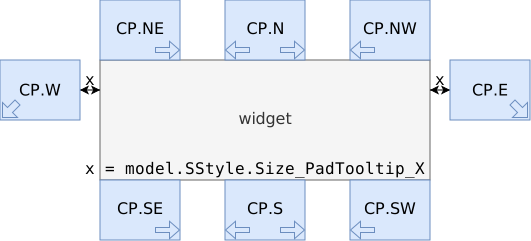
Fig. 1 Tooltip position and growth direction#
- Parameters:
widget (MixinWidget) – The widget to consider as parent.
position (CP | None) – The relative position to show the tooltip. When
None, usespositioninstead (defaults toCP.default). Defaults toNone.force (bool) – Force bogus size adjustment, when heuristics demand a true size calculation. Defaults to
False, should not really be used.
See also
Use
adjustGeometryAutoto pre-select the parent widget. This should be done in most situations.
- adjustGeometryAuto(event=None, **kwargs) None#
Adjust tooltip geometry in relation to the parent widget.
- Parameters:
event – Optional, unused. This exists for API compatibility with the
onClickfunctions.kwargs – Passed to the upstream
adjustGeometryfunction.
See also
Use
adjustGeometryif you want to consider another widget as the “parent”.
- disable(*, immediate: bool = True)#
Disable the tooltip itself.
This means disabling (if needed) the binding that shows the popup. The
immediateflag controls whether to attempt to hide the popup right away.- Parameters:
immediate (bool) – Hide the popup if is being shown now. Defaults to
True.
- enable(*, immediate: bool = True)#
Enable the tooltip itself.
This means enabling (if needed) the binding that shows the popup. The
immediateflag controls whether to attempt to show the popup if the mouse is already hovering over the widget.- Parameters:
immediate (bool) – Show the popup if the mouse is already hovering over the widget now. Defaults to
True.
- onScheduledChange(state: bool | None) None#
Callback to be called when the tooltip is shown or hidden.
Defaults to adjusting the geometry. Can be overriden, take care of calling this function at the same time. Use something like this:
def onScheduledChange(self, state):
    pass  # Run Code Before `adjustGeometry`
    super().onScheduledChange(state)  # Call this function
    pass  # Run Code After `adjustGeometry`
- setup_tooltip() None#
Setup the tooltip events.
See the
immediateargument when creating the object.
- isAuto: Optional[bool] = None#
- position: CP#
Relative position to show the tooltip.
This is based on the parent widget, but can be overriden.
- ttid: str#
Tooltip Identifier.
This is an unique identifier for the tooltip itself. Used in several mappings that require unique keys.
This is created automatically and read only.
- class tkmilan.TooltipSingleStatic(parent: MixinWidget, *args, tt_position: CP = CP.default, tt_delay: int | None = None, immediate: bool = True, rpad: int | None = 1, style: Style = Tooltip.Style(tool_window=True, resizable=True, transient=True, override_redirect=True, center=False), **kwargs)#
Bases:
TooltipThe most basic
Tooltip, with a staticLabel.Leveraged by the
attachTooltipfunction. In the common case, this tooltip is shown when hovering over the attached widget.This is the most basic tooltip that can be defined. To make further changes, subclass
Tooltipdirectly.- setup_widgets(message: str, *, labelArgs=None)#
Setup the default child widgets, in this case a single
messageLabel.
- gkeys: FrozenSet[str]#
The supported
model.GuiStatekeys.
- position: CP#
Relative position to show the tooltip.
This is based on the parent widget, but can be overriden.
- state_scheduled: var.Boolean#
Track the window scheduled state.
This is a
variablethat indicates the scheduled state. Can be written to to change the state.See also
See also
scheduledfor the low level state tracker.
- ttid: str#
Tooltip Identifier.
This is an unique identifier for the tooltip itself. Used in several mappings that require unique keys.
This is created automatically and read only.
- widgets: Mapping[str, MixinWidget]#
Store mapping between widget name and
widget object.See
setup_widgets.
- class tkmilan.TooltipValidation(parent: MixinWidget, *args, tt_position: CP = CP.default, tt_delay: int | None = None, immediate: bool = True, rpad: int | None = 1, style: Style = Tooltip.Style(tool_window=True, resizable=True, transient=True, override_redirect=True, center=False), **kwargs)#
Bases:
TooltipA
Tooltip, specialized for validation uses.Leveraged by the
putTooltipfunction. In the common case, this tooltip is shown when the attached widget is invalid, and hidden when the attached widget is valid. This is a static tooltip, the message never changes during the validation, it is intended for simple validations.If you need to change the default error message, subclass this and redefine
setup_tooltip_state.To make further changes (add new widgets), subclass this and redefine
wstate_single,setup_widgetsandsetup_tooltip_state.- setup_tooltip_state(variable: Spec | None)#
Setup the error message when showing the tooltip.
This is not a dynamic function, it is called only on widget creation, by the
putTooltipfunction.- Parameters:
variable (Spec | None) – The attached widget variable, if available.
- setup_widgets()#
Setup the default child widgets, in this case a single
messageLabelStateful.If you subclass this, don’t forget to change
wstate_singleandsetup_tooltip_statetoo.
- gkeys: FrozenSet[str]#
The supported
model.GuiStatekeys.
- position: CP#
Relative position to show the tooltip.
This is based on the parent widget, but can be overriden.
- state_scheduled: var.Boolean#
Track the window scheduled state.
This is a
variablethat indicates the scheduled state. Can be written to to change the state.See also
See also
scheduledfor the low level state tracker.
- ttid: str#
Tooltip Identifier.
This is an unique identifier for the tooltip itself. Used in several mappings that require unique keys.
This is created automatically and read only.
- widgets: Mapping[str, MixinWidget]#
Store mapping between widget name and
widget object.See
setup_widgets.
- wstate_single: Union[None, bool, str] = 'message'#
Default value for
wstate_single.
- class tkmilan.Tree(parent: ContainerWidget, *, variable: varTree | None = None, label: TreeColumn | str | None, columns: Mapping[str, TreeColumn | str], columns_stretch: None | bool | Sequence[str | None] = None, columns_autosize: bool | None = True, columnConfig: Mapping[str, Any] | None = None, selectable: bool = False, selectable_unselect: bool | None = None, tags: Mapping[str, TreeRow] | None = None, openlevel: int = 1, expand: bool = True, style: Style = Tree.Style(show_headings=True, show_labels=True, selectable_nodoubleclick=True, altbg=True, altbg_sindex=1, colour_altbg='lightgrey', autosize_label='AutoSize', autosize_lcolumn_lspace=20, autosize_lcolumn_osize=20, autosize_heading_multiplier=6, autosize_styleid=None), styleID: str | None = None, **kwargs)#
Bases:
Treeview,SingleWidgetA hierarchical multicolumn data display widget.
This widget is capable of showing a hierarchy of data records (one per row). Each record can have multiple columns of data. Each record can store arbitrary data on its
Element, exposed on theonSelectfunction.The widget support selectable data records (see
selectable). See alsoonSelectfor a callback triggered by this action.You can also unselect the current data record by clicking empty space (if available), or by holding Ctrl when clicking the currently selected data record. This unselecting behaviour can be controlled independently, see
selectable_unselect).Note that if
selectableisTrueandselectable_unselectisFalse, it is impossible for the user to unselect a data record (this might be a desirable behaviour).You can define a mapping between tags and the corresponding
model.TreeRowconfiguration. When an element has multiple tags, the priority is the one on the dictionary. Internal tags that might be used for implementing other features always have less priority.See
Python ttk.TreeviewandTkttk.Treeview documentation.- Parameters:
variable (varTree | None) – Use an externally defined variable, instead of creating a new one specific for this widget.
label (TreeColumn | str | None) – The heading text for the first column, which includes the labels. Supports also a
Columnobject directly.columns (Mapping[str, TreeColumn | str]) – Mapping between column identifiers and its titles. Supports also a direct map between identifier and
Column.columns_stretch (None | bool | Sequence[str | None]) –
Select which columns to stretch, a list of identifiers.
Nonemarks the label column. There are also special values:Truestretches all columnsFalsestretches no columnsNonestretches only the label column. This is the default.
There should be at least one stretchable column, or the container is not completely filled with the data. This is checked, but as a warning only.
columns_autosize (bool | None) –
Configure column automatic sizing, calling the
columns_autosizefunction.When
True(the default), the function is called for all content changes.When
False, the function is never called automatically.When
None, there’s a small checkbox on the upper left corner of the widget that controls if the function is called or not.
columnConfig (Mapping[str, Any] | None) – Default configuration for basic string
columnsmapping. This also applies to the label column. Advanced usage only. Overridescolumns_stretch.selectable (bool) – Should the user be able to select one of the values? Defaults to
False.selectable_unselect (bool | None) – Should the user be able to unselect after selecting one of the values? Optional, follows
selectableconfiguration.tags (Mapping[str, TreeRow] | None) – A mapping of record tags to
Rowconfiguration. Optional.openlevel (int) – The hierarchy level to open the elements. Defaults to
1, only the toplevel elements are opened. Set to0to close all, and to a really big number to open all.expand (bool) – Grow the widget to match the container grid size. This is usually supported for containers, but it is included here.
style (Style) – Configure the widget style.
styleID (str | None) – Set a style identifier. Combined with the widget type in
RootWindow.register_styleID.parent (ContainerWidget) – The parent widget. Can be a
RootWindowor anothermixin.ContainerWidget.
See also
Listbox: Simplified version of this- Column#
alias of
TreeColumn
- Element#
alias of
TreeElement
- class Style(_default: bool = False, show_headings: bool = True, show_labels: bool = True, selectable_nodoubleclick: bool = True, altbg: bool = True, altbg_sindex: Literal[0, 1] = 1, colour_altbg: str = 'lightgrey', autosize_label: str = 'AutoSize', autosize_lcolumn_lspace: int = 20, autosize_lcolumn_osize: int = 20, autosize_heading_multiplier: int = 6, autosize_styleid: str | None = None)#
Bases:
WStyleTreestyle object.These are the style configurations:
- Parameters:
show_headings (bool) – Show column title headings.
show_labels (bool) – Show the first column, which includes the labels.
selectable_nodoubleclick (bool) – Disable double-click binding. This is to avoid detecting spuriours double click events. Defaults to
True.altbg (bool) – Show alternate backgrounds for each record.
altbg_sindex (Literal[0, 1]) –
altbginitial alternate colour index.autosize_label (str) – Label for the
columns_autosizestate checkbox.autosize_lcolumn_lspace (int) – Spacing for each level indentation (parent items).
autosize_lcolumn_osize (int) – Width of the
[+]button on each item.autosize_heading_multiplier (int) – Multiplier to the regular label size, since this is a boldface. Use
0if you want to ignore the heading label when automatically resizing.autosize_styleid (str | None) –
styleIDfor thecolumns_autosizestate checkbox. Optional, if set the${autosize_styleid}.TCheckbuttonstyle must be defined. A good font to use isSStyle.Font_Button_Small.
These are the colours:
- Parameters:
colour_altbg (str) –
altbgalternate line colour. Used as the background colour.
- bindClickHeader(action: Callable[[TreeColumn], None], **kwargs)#
Create a binding to be called when clicking any header.
This is similar to a
trace.- Parameters:
action (Callable[[TreeColumn], None]) – The function to be called when clicking any header.
All other arguments are passed to the
actionfunction.See also
See
onClickHeaderfor an alternative to this.
- bindSelect(action: Callable[[str, Any], None], **kwargs)#
Create a binding to be called when clicking this widget.
This is similar to a
trace.- Parameters:
action (Callable[[str, Any], None]) – The function to be called when clicking the widget.
All other arguments are passed to the
actionfunction.See also
See
onSelectfor an alternative to this.
- columns_autosize() None#
Automatically set the column widths.
Uses heristics to find the “natural” column widths, it might not work perfectly.
- columns_size(widths: Mapping[str, int]) None#
Set the column widths.
- Parameters:
widths (Mapping[str, int]) – Mapping between column identifiers and column
width.
- element_append(element: TreeElement) str#
Append an element on the
Treewithout recreating the state.This is a
wstatealternative, for appending an existing element without having to regenerate the entire state. This has much better performance characteristics, particularly for big trees.The element must be on the toplevel and must not have any children.
- Parameters:
element (TreeElement) – The new element to append.
- Returns:
Returns the element ID of the appended element.
- Return type:
str
See also
See
element_insertto insert an element in an efficient way,element_rmto remove an element in an efficient way,element_moveto move an element in an efficient way.
- element_insert(element: TreeElement, where: int | None = 0) str#
Insert an element on any index of the
Treewithout recreating the state.This is a
wstatealternative, for inserting an existing element without having to regenerate the entire state. This has much better performance characteristics, particularly for big trees.For now this does not support any children elements anywhere. The element must be on the toplevel and must not have any children.
- Parameters:
element (TreeElement) – The new element to append.
where (int | None) – The new index for the new element. Defaults to
0, to insert at the beginning.
- Returns:
Returns the element ID of the inserted element.
- Return type:
str
See also
See
element_appendto append an element in an efficient way,element_rmto remove an element in an efficient way,element_moveto move an element in an efficient way.
- element_move(wid: str, newindex: int) bool#
Move element on the
Treewithout recreating the state.This is a
wstatealternative, for moving an existing element without having to regenerate the entire state. This has much better performance characteristics, particularly for big trees.For now this does not support any children elements anywhere. Everything must remain on the toplevel level.
- Parameters:
wid (str) – The element identifier to move.
newindex (int) – The new index for the element.
- Returns:
Truewhen the state is effectively changed,Falseotherwise. The reasons for not changing the state might be a no-op (the current and the new indexes are the same), or an invalid operation (moving an element outside the range).- Return type:
bool
See also
You can get the selected element using
wsid.See
element_rmto remove an element in an efficient way,element_append/element_insertto insert an element in an efficient way.
- element_rm(wid: str) bool#
Remove element on the
Treewithout recreating the state.This is a
wstatealternative, for removing an existing element without having to regenerate the entire state. This has much better performance characteristics, particularly for big trees.For now this does not support any children elements anywhere. The element must be on the toplevel and must not have any children.
- Parameters:
wid (str) – The element identifier to remove.
- Returns:
Returns
Trueif the element is actually removed (always).- Return type:
bool
See also
See
element_moveto move an element in an efficient way,element_append/element_insertto insert an element in an efficient way.
- etag(wid: str, *tags: str, add: None | str | Sequence[str] = None, remove: None | str | Sequence[str] = None) Set[str]#
Manipulate tags for an element.
There are two exclusive modes for this function to work:
The
add/removeparameters allow for delta updates to the existing tags, acting as a set.Otherwise, set
tagsas the only tags, overriding the current settings.
- onClickHeader(column: TreeColumn)#
Callback to be executed when clicking any header.
Defaults to doing nothing.
Available for subclass redefinition.
- Parameters:
column (TreeColumn) – The
Columnobject
- onSelect(treeid: str, data: Any | None = None) None#
Callback to be executed when clicking this widget.
Defaults to doing nothing.
Available for subclass redefinition.
- Parameters:
treeid (str) – The selected tree id
data (Any | None) – The arbitrary data associated with the element. Defaults to
None.
- wcol(identifier: str) TreeColumn#
Get the
Columncorresponding to the given identifier.The identifier can be one of the following formats:
#0: The label columnAny of the
wcolumnskeys: The corresponding column#nfor any numericn: The index (starts on 1) for the visible column.
Note
There is no support for the visible columns being different from the data columns, so
#nalways refers to the index intowcolumns.There is no Python documentation, see
TkTreeview column identifiers documentation.- Parameters:
identifier (str) – The column identifier. See above for all the possible formats.
- wsel(wid: str | None, *, see: bool = True, focus: bool = True) str | None#
Set the currently selected element identifier.
Defaults to ensuring the selected element is visible and focused, by scrolling the view. This is controlled by the
seeandfocusarguments, enabled by default.- Parameters:
wid (str | None) – The element identifier to select.
Noneto clear the selection.see (bool) – Ensure the element is visible.
focus (bool) – Ensure the element has focus.
- Returns:
Return the source
widargument.- Return type:
str | None
See also
Use
wsidto get the currently selected data.
- wselect(selection: Any | None, **kwargs) str | None#
Set the current selection data.
This will select the element with the given data. This will need to read the whole data, and does not support multiple elements with the same data. Avoid using this unless absolutely needed, use
wseldirectly.- Parameters:
selection (Any | None) – The element data to select.
Noneclears the selection.
All other arguments are passed to the upstream
wselfunction.- Returns:
Return the selected element identifier.
- Return type:
str | None
See also
Use
wselto select a specific identifier. Usewselectionto get the currently selected data.
- wselection() Any | None#
Get the selected data.
- Returns:
Since this supports only a single selection, return the selected value, or
Nonewhen nothing is selected.If the widget was created without the
selectableflag, this always returnsNone.- Return type:
Any | None
See also
Use
wselectto set the currently selected data.
- wsid() str | None#
Get the selected element identifier.
- Returns:
Elementid, orNonewhen nothing is selected.If the widget was created without the
selectableflag, this always returnsNone.- Return type:
str | None
See also
Use
wselto set the currently selected element identifier.
- wwhere(wid: str) Tuple[str | None, int]#
Get the element location.
Returns the element location in a non-ambigous manner.
- Parameters:
wid (str) – The element identifier to locate
- Returns:
A tuple of parent element identifier (
Nonewhen it is a toplevel element), and the index on its children.- Return type:
Tuple[str | None, int]
- lcolumn: TreeColumn#
The label
Columnobject.
- wcolumns: Mapping[str, TreeColumn]#
Map principal column identifiers to
Columnobjects.
- wdata: ReorderableDict[str, Any]#
Map element id to
TreeElementdata.This will have the same order as the GUI itself, it can be used as an ordered list of element id.
- class tkmilan.varTree(master=None, value=None, name=None)#
Bases:
ObjectList[TreeElement]Type-Checking variable type for
Tree.
- tkmilan.LOGGING_VERBOSE(modules: bool = True, submodules: bool = True) Iterator[Logger]#
Shows spammy modules, should be silenced by the calling application.
These sub-modules sent enormous amount of logs, bordering on spam, on the
logging.DEBUGsetting.The calling application should use something like this to silence them:
if loglevel == logging.DEBUG:
    for log in LOGGING_VERBOSE():
        log.setLevel(logging.INFO)
Note
A similar feature existed in the past, as
MODULES_VERBOSE. Migrate to this alternative ASAP.Note
See the
TKMILAN_DEBUGenvironment variable for information on how to configure this at runtime.
- tkmilan.RadioFrame(*args, **kwargs)#
Legacy wrapper for
RadioFrameLabelled
- tkmilan.RadioFrame_Raw(*args, **kwargs)#
Legacy wrapper for
RadioFrameUnlabelled
- tkmilan.ScrolledH(*args, **kwargs) Scrolled#
Wrapper for
Scrolled, forcingscrollVerticaltoFalse.This means the horizontal scrolling is automatic, while the vertical is disabled.
- tkmilan.ScrolledV(*args, **kwargs) Scrolled#
Wrapper for
Scrolled, forcingscrollHorizontaltoFalseThis means the vertical scrolling is automatic, while the horizontal is disabled.
- tkmilan.SeparatorH(parent: ContainerWidget, **kwargs) Separator#
Wrapper for
Separator, forcingorientationtoHORIZONTAL
- tkmilan.SeparatorV(parent: ContainerWidget, **kwargs) Separator#
Wrapper for
Separator, forcingorientationtoVERTICAL
- tkmilan.AUTO = 'auto'#
Automatic Layout.
- tkmilan.HORIZONTAL = 'horizontal'#
Horizontal (1 row) Layout.
- tkmilan.MODULES_VERBOSE = [1]#
DEPRECATED. See
LOGGING_VERBOSE.
- tkmilan.VERTICAL = 'vertical'#
Vertical (1 column) Layout.
- tkmilan.varEventBusEventType#
Type-Checking variable type for
eventinRootWindow.register_eventbus_responsealias of
Union[None,Type[bool],Type[ELRes]]
- tkmilan.varOrientation#
Type-Checking variable type for
orientationinFramePaned/Separatoralias of
Union[Literal[‘vertical’],Literal[‘horizontal’]]
- tkmilan.varSidSettings#
Type-Checking variable type for
RootWindow.styleIDsmappingalias of
Union[str,Tuple[str, …],Tuple[int, …],bool,DStyle]
Modules
Auto Layout capabilities. |
|
Model the background Event Loop processing. |
|
Models to store diagram information. |
|
Renderer for |
|
All custom exceptions raised in the project. |
|
Functions to manipulate widgets and other objects, that make no sense to be used externally. |
|
Create |
|
All the mixin classes, to be reused internally. |
|
Models to store complex information in unambiguous ways. |
|
Parsers for custom formats. |
|
Utility functions. |
|
Validation objects for |
|
Variable classes. |